• Which the release of FS2020 we see an explosition of activity on the forun and of course we are very happy to see this. But having all questions about FS2020 in one forum becomes a bit messy. So therefore we would like to ask you all to use the following guidelines when posting your questions:

    • Tag FS2020 specific questions with the MSFS2020 tag.
    • Questions about making 3D assets can be posted in the 3D asset design forum. Either post them in the subforum of the modelling tool you use or in the general forum if they are general.
    • Questions about aircraft design can be posted in the Aircraft design forum
    • Questions about airport design can be posted in the FS2020 airport design forum. Once airport development tools have been updated for FS2020 you can post tool speciifc questions in the subforums of those tools as well of course.
    • Questions about terrain design can be posted in the FS2020 terrain design forum.
    • Questions about SimConnect can be posted in the SimConnect forum.

    Any other question that is not specific to an aspect of development or tool can be posted in the General chat forum.

    By following these guidelines we make sure that the forums remain easy to read for everybody and also that the right people can find your post to answer it.

FSX colored trim position in percent text string

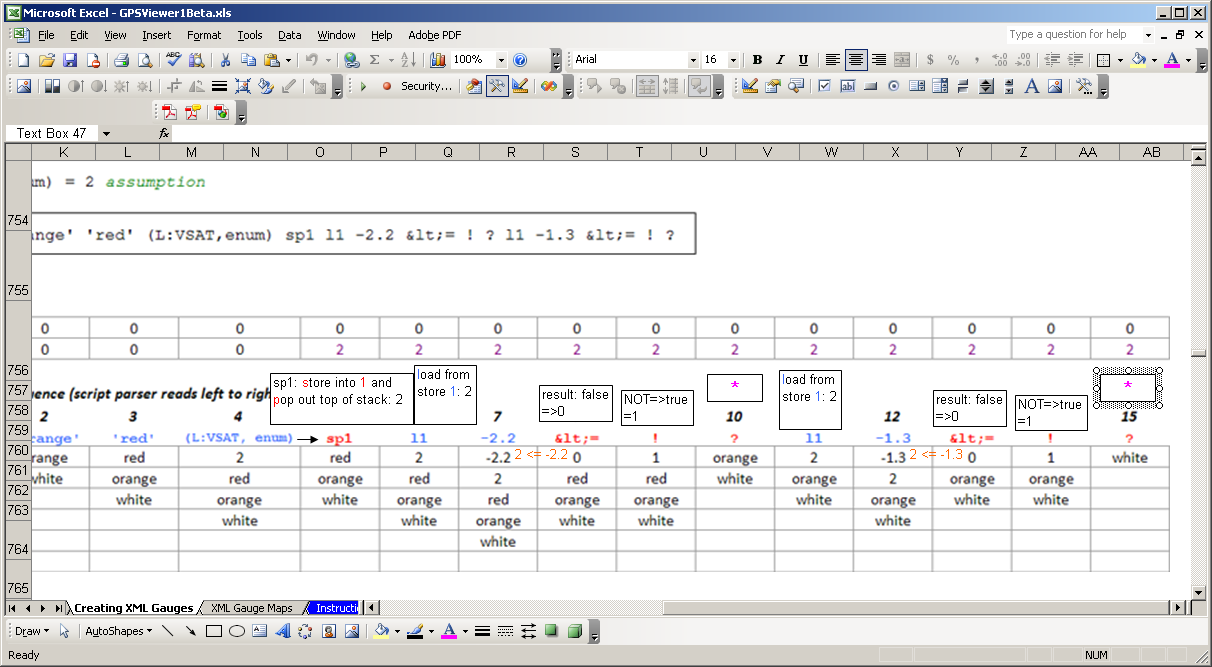
Okay, I've read and mulled over the explanations and am still confused about the ? logic operator. I've included a picture. 1) In the:
'white' 'orange' 'red' (L:VSAT,enum) sp1 l1 -2.2 <= ! ? l1 -1.3 <= ! ?

Why is the ! (NOT) logic used; wouldn't it been less typing (and confusion) to use: l1 -2.2 > ?

2) In steps ( 10 and 15, marked with a magenta asterisk * ) in the above spreadsheet, how does the ? logic remove ( step 10: [1 and red] and step 15: [1 and orange] ) from the stack?

Comparison_Logic.PNG
 
Okay, I've read and mulled over the explanations and am still confused about the ? logic operator. I've included a picture. 1) In the:
'white' 'orange' 'red' (L:VSAT,enum) sp1 l1 -2.2 <= ! ? l1 -1.3 <= ! ?

Why is the ! (NOT) logic used; wouldn't it been less typing (and confusion) to use: l1 -2.2 > ?

2) In steps ( 10 and 15, marked with a magenta asterisk * ) in the above spreadsheet, how does the ? logic remove ( step 10: [1 and red] and step 15: [1 and orange] ) from the stack?

See the last row in the "Comparison operators" table in https://docs.microsoft.com/en-us/previous-versions/microsoft-esp/cc526953(v=msdn.10)
 
Yes, I've read that (a long time ago). Extracted from it:

? The third operand determines whether the first (True) or second (False) is selected. 3 A B True ? This evaluates to A.

It is meaningless to me. If someone wants to offer help, it would be greatly appreciated to give a more explicit explanation/example. Notice in the picture I show, I tried to be as explicit as possible as to the issue I'm trying to resolve. Notice how I provided an explanation for each step in the spreadsheet, highlighting (*) the steps (10 and 15) that I did not understand. And I still don't understand how the top 2 variables got popped out with use of the ? comparison logic. BTW, I have all the SDK's for FS9 and I could not find anything on the ? comparison. As a matter of curiosity, I did add a fourth color and it works.

... ('white' 'orange' 'red' 'green' (L:VSAT, enum) sp1 l1 -2.2 <= ! ? l1 -1.3 <= ! ? l1 -0.3 <= ! ?) ...

I think this would work for more comparisons. Also, I did notice something, as to why I came across this issue in the first place. I've notice that this comparison works as long as the values of -2.2, -1.3, etc. or whatever, are increasing/decreasing sequentially. Using n4gix's and gr8guitar's examples of adding the 1's and 0's make sense. However, when I tried to use the ? comparison for variables that are boolean, i.e.: [ (A:GPS DRIVES NAV1,bool) (A:CIRCUIT AVIONICS ON,bool) (A:NAV HAS LOCALIZER:1,bool) ], the expected result did not work. I am modifying an XML HSI gauge to add the second Nav radio (picture enclosed) and wanted the NAV flag to function properly. Note: the little white -1.0 in the lower-left corner is a test of the above color example.

HSI modified.PNG
 
The first "?" picks between white and orange, the second between orange and red and the third between red and green.
 
Yes, I've read that (a long time ago). Extracted from it:

? The third operand determines whether the first (True) or second (False) is selected. 3 A B True ? This evaluates to A.
Consider the effect of the combination of comparison operators on the expression being evaluated:
A B True ? evaluates to A
A B True ! ? evaluates to B
 
Why is the ! (NOT) logic used; wouldn't it been less typing (and confusion) to use: l1 -2.2 > ?

If you are debating the choice of example XML script, then you might have missed the point of the wiki which is only to demonstrate how the stack behaves as the XML parser evaluates script.

2) In steps ( 10 and 15, marked with a magenta asterisk * ) in the above spreadsheet, how does the ? logic remove ( step 10: [1 and red] and step 15: [1 and orange] ) from the stack?
It is meaningless to me.

If use of the operator ? is still unclear, then the stack gauge (reply #12 in this thread) might be useful. Dissect the issue using the stack and figure it out. Sometimes, that's the only way.

To your point, "I still don't understand how the top 2 variables got popped out with use of the ? ", here's the SDK explanation which is also copied in the Stack Example wiki:

When the script parser comes across an operator, it pops from the stack the number of operands that the operator works on (usually one or two values).
Whatever value is left on top of the stack at the end of the execution is the result of the calculated expression.


Up to you to decide if the ? operator is useful for your gauge work. If you want to see it in action, check out the stock gps_500.xml or g1000_pfd.xml gauges.

Bob

From the gps_500.xml gauge:

<ObjectDetailLayerFlightPlan>0xE 0xF (@c:FlightPlanIsActiveApproach) ?</ObjectDetailLayerFlightPlan>

If FlightPlanIsActiveApproach is 0 (false), then ObjectDetailLayerFlightPlan is 0xF = 15. If FlightPlanIsActiveApproach is 1 (true), then ObjectDetailLayerFlightPlan is 0xE = 14. See Bill Leamings reply #26.

1535779211863.png
 
Last edited:
To 727 heretic, you are stating the obvious = no help. The question(s) are how? To n4gix and rpmc, thanks!

1) As far as the SDK's (if in FS9), where is that information? I have: ABL_SDK, AIRCRAFT_CONTAINER_SDK, BGLCOMP_SDK, Cabdir_SFK, FSEdit_SDK, Panels_SDK, and TERRAIN_SDK, and I cannot find anything that was described by rpmc (in part: ... here's the SDK explanation ....).

2) per n4gix:
A B True ? evaluates to A
A B True ! ? evaluates to B

Now that is extremely helpful. Too bad the "A B True ! ? evaluates to B" wasn't in the original Creating XML Gauges. Because at the time, "evaluates to A" by itself didn't make sense to me. The verb "evaluate" to me, means "to examine or scrutinize or to look into". If the word "selects A" had been used, maybe I would have understood. Also, what happens when: A B False ? ... ? Unless this works as: A B True ! ? evaluates to B.

3) And now to my original issue. I realize I could use (or/||) logic but I was, and would still want to understand the ?/comparison instruction. As I stated in #24: ... I've notice that this comparison works as long as the values of -2.2, -1.3, etc. or whatever, are increasing/decreasing sequentially. Using n4gix's and gr8guitar's examples of adding the 1's and 0's make sense. However, when I tried to use the ? comparison for variables that are boolean, i.e.: [ (A:GPS DRIVES NAV1,bool) (A:CIRCUIT AVIONICS ON,bool) (A:NAV HAS LOCALIZER:1,bool) ], the expected result did not work. ...

To make things more simple and easier to test, I came up with the following:

Code:
<Element><Select><Value>
0 (&gt;L:Toggle1,bool)
0 (&gt;L:Toggle2,bool)
0 (&gt;L:Toggle3,bool)
</Value></Select>
</Element>

<Element>
      <Position X="43" Y="27"/>
      <Select>
   <Value> 3 2 1 0 (A:GPS DRIVES NAV1,bool) 1 == ? (A:CIRCUIT AVIONICS ON,bool) 1 == ? (A:NAV1 HAS LOCALIZER,bool) 1 == ? </Value>

  <Case Value="0">
            <Image Name="HSI_Flag_Nav.bmp" ImageSizes="37,19"/>
         </Case>
        </Select>
   </Element>

Also tried: (A:NAV HAS LOCALIZER:1,bool). This did not work as expected. However:

<Value> 3 2 1 0 (L:Toggle1,bool) 1 == ? (L:Toggle2,bool) 1 == ? (L:Toggle3,bool) 1 == ? </Value>

This worked as expected - confused. Why did the actual FS variables not work and the Local variables did? So this is when I got interested in how the ? comparison actually works.
 
As far as the SDK's (if in FS9) ... I cannot find anything that was described by rpmc (in part: ... here's the SDK explanation ....).
...

Too bad the "A B True ! ? evaluates to B" wasn't in the original Creating XML Gauges. Because at the time, "evaluates to A" by itself didn't make sense to me. The verb "evaluate" to me, means "to examine or scrutinize or to look into". If the word "selects A" had been used, maybe I would have understood. Also, what happens when: A B False ? ... ? Unless this works as: A B True ! ? evaluates to B.

Well, I think it doesn't take long before all of us learn that the SDK (FS9 all the way through P3D v4) isn't always clear and sometimes isn't even accurate. The FS9 Panels SDK does state, "The “?” and “case” operators are selective operations. The third operand of the “?” operation defines which operand, first or second, is the result of the operation", but it may make complete sense only after you already know what the operator does.

This is a situation where the Stack1.xml gauge can truly help anyone that wants to do a deep dive on the stack - you can see what's happening step by step. You could try it on your <Value> expression using the A:Vars and figure out exactly what's going on. A word of caution here is that a few A:Var bools return -1 or 0 rather than 1 or 0. I don't know why and I've forgotten if any of your A:Vars fall in this category without checking in the sim, but if you're expecting 1 and it throws a -1, you can spend hours figuring that out. It may indeed make a big difference in your code's logic. That's also why I encourage everyone writing XML to use a debug gauge like Blackbox. There are similar tools in Tom Aguilo's XMLTools and also a gauge from Doug Dawsons website.

Bob
 
1) I must have gleaned over the the Panels SDK.doc too quickly because I missed this (page 82):

The “?” and “case” operators are selective operations. The third operand of the “?” operation defines which operand, first or second, is the result of the operation.

But honestly, re-reading this did not solve my confusion. But you are correct, rmpc, it is there, thanks.

2) I do recall that some FS variables use the -1, but I was under the assumption that the unit was enum, not bool. Isn't bool only either 1 or 0?

3) I do have the stack1.xml running (see attached picture) but as I made changes, I did not see the stack do live updates. And if I click on the "R", everything blanks out and no live updates are shown. The only time I see a change is if I made a change and then saved the situation and FS first boots up or I reset the flight. BTW, the switch panel shown is a small gauge I use to test other gauges, I'm working on. It has 3 toggle switches, 3 momentary pushbuttons and an up and down counter. In any case, I will keep plugging away until I understand it completely. Thanks for the inputs.

Using the stack gauge.PNG
 
I do recall that some FS variables use the -1, but I was under the assumption that the unit was enum, not bool. Isn't bool only either 1 or 0?

No ... the ones I recall are "bool" according to the SDK and return -1 when you would otherwise normally expect 1. Just a few of these ... not too many.

A word about units - don't read too much into the units designation. Units direct the internal conversion tables so that, for example, the sim can convert miles per hour to knots. But the number format that is actually stored by the sim is unit independent. Variables are double precision (FLOAT64) regardless of the units designation.

All of these are the same in sim storage:

123.45678 (>L:Var, number)
123.45678 (>L:Var, enum)
123.45678 (>L:Var, bool)
123.45678 (>L:Var, puppies)
123.45678 (>L:Var)
 
Last edited:
A bool(ean) value is 0 is false and non-zero is true.

The units difference between number and enum are for human comprehension. A number is any decimal value. An enum is viewed differently and it should be treated differently.

C/C++ definition of an enum(eration):
An enumeration is a distinct type whose value is restricted to a range of values (see below for details), which may include several explicitly named constants ("enumerators"). The values of the constants are values of an integral type known as the underlying type of the enumeration.

English definition of the word enum(eration):
the action of mentioning a number of things one by one.
"the complete enumeration of all possible genetic states"
  • formal
    the action of establishing the number of something.
    "detailed enumeration of the income of the household"

So, while the XML translator inside the sim treats all LVars the same... the reason for the different units is for readability and comprehension.
 
To 727 heretic, you are stating the obvious = no help. The question(s) are how? To n4gix and rpmc, thanks!

2) per n4gix:
A B True ? evaluates to A
A B True ! ? evaluates to B

Now that is extremely helpful. Too bad the "A B True ! ? evaluates to B" wasn't in the original Creating XML Gauges. Because at the time, "evaluates to A" by itself didn't make sense to me. The verb "evaluate" to me, means "to examine or scrutinize or to look into". If the word "selects A" had been used, maybe I would have understood. Also, what happens when: A B False ? ... ? Unless this works as: A B True ! ? evaluates to B.

As Bob has mentioned, the SDK(s) from both MS and L-M are very opaque. The assume far too much foreknowledge of the reader. What is completely missing from the example given is that there is no mention that TRUE is the simply the assumed value of the (token to be evaluated)...

As another example, it is only mentioned once seemingly as a passing thought that the only guaranteed value for any Boolean token is zero! That is precisely why I will never test for "TRUE" if using a Boolean token variable. Instead, I test for not-zero.
 
But since true = any non-zero value if you test for "true" then you are testing for not-zero, right?
 
If "True" or "False" were part of XML, you are correct. However, substitute number for the textual "true" or "false", which is XML syntax:

(A:SomeToken,bool) 1 == if{ Do Something } //may or may not always work since "true" could be any value other than zero, including negative numbers

(A:SomeToken,bool) 0 != if{ Do Something } //will always work, guaranteed
 
To heretic 727, I don't love anything or anyone I don't know; this especially applies to you. I only have degrees of tolerance or appreciation. I think this is the second time you responded to a post of mine and each time you just added no utility value. Have you ever given anyone useful information or are you only here to harass people? Please do not reply to my posts. Any further posts from you to me will be considered as harassment. Okay, now on this subject. Taking into advisement of using non-zero, I tried this:
<Value> 3 2 1 0 (A:GPS DRIVES NAV1,bool) 1 == ? (A:AVIONICS MASTER SWITCH,bool) 0 != ? (A:NAV1 SIGNAL, number) 0 != ? </Value>
But this did not work as hoped. I tried other combinations but to no avail. The stack1.xml gauge did not help me but I did turn to FS_interrogae2std.exe that works with FSUIPC so I could verify the values of the FS variables. Here is a table:

FSUIPC MSFS variable FSinterrogate Reading the buffer yielded
offset usage (description)

132C = (A:GPS DRIVES NAV1,bool) GPS/NAV switch 0=NAV 1=GPS
2E80 = (A:CIRCUIT AVIONICS ON,bool) Avionics Master switch 0=OFF 1= ON
3103 = (A:CIRCUIT AVIONICS ON,bool) Avionics switch 0=OFF 1=ON
07A0 = (A:NAV1 HAS LOCALIZER,bool) Has Nav1 always 1 no matter location, switch positions or frequency
0C52 = (A:NAV1 SIGNAL, number) NAV 1 signal strength ILS freq: 0 until within approx. 26 nm and then 256 until within approx. 1 nm, then increasingly higher than 256

Good to know but it didn't really help me with the ? comparison operator so for now I'll resort back to the or/|| operator. So to make the nav flag visible as I needed:

Code:
<Element>
<Visible> (A:NAV1 SIGNAL, number) ! (A:GPS DRIVES NAV1,bool) || (A:AVIONICS MASTER SWITCH,bool) ! || </Visible>
  <Position X="43" Y="27"/>
            <Image Name="HSI_Flag_Nav.bmp" ImageSizes="37,19"/>
</Element>

proper Nav flag display.PNG


So the NAV flag will show if the signal is invalid (109.70 is the proper ILS freq. for KMCI (fs2004)) or the GPS is selected or the avionics switch is off. Yes, in this gauge, I want the flag to show if GPS is selected to warn me to select NAV on a VOR or ILS approach. As I mentioned before, I am modifying an HSI to display NAV 2 info in the same gauge, so I have more work to do but now I can go forward but without understanding the ? comparison operator - ugh. The FSInterrogate is great, like many of the tools out there. The only thing that would have been a bit more efficient is if the usage (description) had used the FS variables since the FS variables had to be observed to make the program work. I know there are a few pdf's listing the FSUIPC offsets and FS variables but none I found cross-referenced FSUIPC offsets with the FS variables. Maybe someday I'll find the time to do it if there isn't one already. Again, thanks to those that took the time to help - that is greatly appreciated.
 
Last edited:
Bill, I don't test that way in XML. I test for (A:Some_Token, bool) or (A:Some_Token, bool) !

Example: (A:Some_Token, bool) if{ (K:Some_Event) }

Some_Event will be triggered if Some_Token is true (i.e. non-zero).

This has always worked for me so far.
 
Back
Top