• Which the release of FS2020 we see an explosition of activity on the forun and of course we are very happy to see this. But having all questions about FS2020 in one forum becomes a bit messy. So therefore we would like to ask you all to use the following guidelines when posting your questions:

    • Tag FS2020 specific questions with the MSFS2020 tag.
    • Questions about making 3D assets can be posted in the 3D asset design forum. Either post them in the subforum of the modelling tool you use or in the general forum if they are general.
    • Questions about aircraft design can be posted in the Aircraft design forum
    • Questions about airport design can be posted in the FS2020 airport design forum. Once airport development tools have been updated for FS2020 you can post tool speciifc questions in the subforums of those tools as well of course.
    • Questions about terrain design can be posted in the FS2020 terrain design forum.
    • Questions about SimConnect can be posted in the SimConnect forum.

    Any other question that is not specific to an aspect of development or tool can be posted in the General chat forum.

    By following these guidelines we make sure that the forums remain easy to read for everybody and also that the right people can find your post to answer it.

Coordinate Systems and Object Placement Issues

scruffyduck

Administrator
Staff member
FSDevConf team
Resource contributor
Messages
34,981
Country
unitedkingdom
I am starting this thread to deal with reports that ADE does not place objects accurately - that is the object as placed in FS does not match the position as made in ADE.

Please do not use this for placement issues related to the GP Library - these need to be dealt with in the threads for that. However there seem to be reports that ADE generally is not making an accurate placement. We know that it uses approximations but my tests in both FS9 and FSX do not show the sort of disrepencies being reported.

I would like to ensure that ADE uses the same code to calculate placement as FS9 and FSX (yes I know they can be different)

One thing I am aware of is that accurate placement of small objects can be affected by the size and shape of ADE selection edges and handles.
 
Hopefully this will be a very short thread Jon.

Per our private discussions, FS9 uses different earth's radius constants for latitude and longitude and ADE makes use of both constants. I don't think the same applies to FSX, which uses round-earth computation. However, since ADE uses the same computations for both FS9 and FSX, I plan to adopt that approach in ADE-GP.

This should eliminate the offset for all by very remote from ARP ground polys. Certainly, ADE's use of two constants explains what I have observed.

Don
 
Hopefully this will be a very short thread Jon.

Per our private discussions, FS9 uses different earth's radius constants for latitude and longitude and ADE makes use of both constants. I don't think the same applies to FSX, which uses round-earth computation. However, since ADE uses the same computations for both FS9 and FSX, I plan to adopt that approach in ADE-GP.

This should eliminate the offset for all by very remote from ARP ground polys. Certainly, ADE's use of two constants explains what I have observed.

Don

Thanks Don

Certainly ADE gets good coincidence with FSX using the same code as FS9.
 
Certainly ADE gets good coincidence with FSX using the same code as FS9.
Didn't mean to imply otherwise, Jon. At distances likely to be encountered in an ADE file, the differences between flat-earth and round earth are trivial.

Don
 
Didn't mean to imply otherwise, Jon. At distances likely to be encountered in an ADE file, the differences between flat-earth and round earth are trivial.

Don

No worries Don - in fact I was just pleased :)
 
Hi Folks

Jon -
I've not been following any topics discussing any unexpected displacements
but the following might possibly be related.

These're only observations from creating a single airport,
as such, require further investigation.


Not in any way casting aspersions on any toolset,
rather, maybe users are expecting coherence
when comparing apples against cheese. :D


Using an SBuilderX, Google derived hi-res composite
I created a background photoscenery for an airport.

As per ADE's restrictions, (max < 7.5Mb images),
I created a relatively low-res background jpg
which I'd then utilised in ADE to create an as-best-possible-fit AFD.


Once this AFD was loaded in-game,
whilst tracking taxiing traffic, (deliberately low-MOI, high-response, AI),
over the same original-source based hi-res photoscenery,
I noticed small displacements from expected taxiway positions, (<1m).

These minor displacements apparently increased outwardly,
with distance from the background image's origin.


Unlike FS, which uses WGS84,
Google Maps 'supposedly' uses a close variant of the Mercator projection.

As such,
any object-placement, dependent on an imported Google-derived tile-set
might possibly be subjected to induced transformation errors.


HTH
ATB
Paul
 
Last edited:
Hi Paul

Well I would agree that different projections will give different results. ADE can be set to use more accurate WGS84 algorithms but the differences are small over short distances.

The accuracy of the algorithms ADE uses are generally good enough for calculations based on the distances involved in airports. However the error will increase with distance from the ARP since that is what is used as the reference point to determine placement of the airport elements.

What I have tried to do is to use methods which will have ADE match FS even though both might be wrong in respect of a background image taken from Google or Bing or whatever.

In fact most stuff over a small area is not going to exhibit much error. However if a map or other background has a projection other that WGS84 it should be converted to WGS84 before using it.

I know a lot of folks will disagree but for me a placement error of less than 1m is not really significant. Sometimes I think we are trying to push the 'technology' beyond the mathematical precision of the tools and the FS engine itself.
 
Hi,

Since ADE makes code for bglcomp I would assume this to be not such a big issue. The XML files store the latitude and longitude. So that makes them the same for fs2004 and fsx. If the background image also uses wgs84 then I don't see how ADE could have inaccurate placement.

It is only when using xyz coordinates in meters, like 3d objects or ground polygons do, that you get into the difference between fs2004 and fsx. But then the right formulas for the fs2004 flat earth or fsx round earth you can get everything accurate again. That's what I do in the modelconverterx ground polygon wizard. And there I can have polygons with different reference points line up exactly (even a gap of a few centimeters you would see already in that case and they are not there).
 
Hi Arno

That is what I have found. since ADE is representing a 'facsimile' of the airport so long as the relationship between elements matches that in FS then it works. Thus so far I have found that the same code generating coordinates works equally well for FS9 and FSX.
 
Hello:

It's good to see even more features implemented into ADE with each new release, and I greatly appreciate the efforts made to improve accuracy in placement of objects relative to a correctly projected Geo-rectified background image in ADE as well.

Although my own personal preference for a higher degree of precision in placement of content for FS may not be shared by all FS Developers here, I believe it might be helpful (for purposes of considering options for possible code revision in the future), to post a link to some interesting details of what the interconversion formulas reportedly are for "The Google Maps / Bing Maps Spherical Mercator Projection" and WGS84:


"Firstly, you should start by making sure that you’re supplying the correct EPSG code, 3857, and that it corresponds to the projection parameters listed above.

However, unless you’re using a conversion library that has been specifically designed to handle the special case of the Bing Maps / Google Maps projection, you’re also going to have to provide a little bit more information to explain that the projection should occur from the sphere rather than the WGS84 ellipsoid specified in the geographic coordinates system. That additional information can be supplied in different ways
":

http://alastaira.wordpress.com/2011/01/23/the-google-maps-bing-maps-spherical-mercator-projection/


Hopefully this information might someday prove helpful to solving some baffling misalignment scenarios FS Developers might encounter.


AFAIK, such formulas haven't (yet) addressed what further corrections are required as a function of the "Z" coordinate (aka elevation above the surface of the Earth relative to a WGS84 terrain model), which adds another element of complexity to accurate computation of FS quad matrix grid coordinates (and 3D "shape" of FS quads) ...for those 'pushing the envelope' with pioneering efforts to implement FS flights between objects placed in low earth orbit at- or close to- the 100,000,000 feet of max elevation actually navigable in the FSX 3D world model:


[EDITED]

"The maximum altitude in the game has been increased to 100,000,000 ft (30,480,000 Meters or 18,939.393939 statute miles). Therefore, FSX maximum altitude is approximately 2.39 times the diameter of the Earth at the equator."

http://en.wikipedia.org/wiki/Microsoft_Flight_Simulator_X


NOTE: The international Space Station (aka "ISS") is maintained at an orbital altitude of between 330 km (205.052 statute mi) and 435 km (270.296 statute miles)

https://en.wikipedia.org/wiki/International_Space_Station


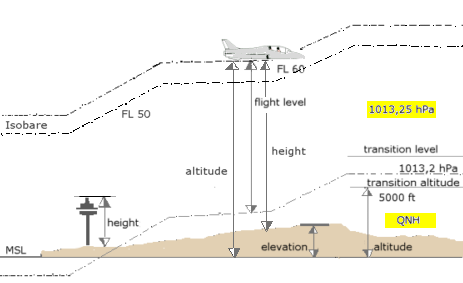
Vertical_distances.png


Some related links:

http://en.wikipedia.org/wiki/Geodesy#Heights

http://en.wikipedia.org/wiki/Altitude#Altitude_in_aviation

http://en.wikipedia.org/wiki/Transition_altitude#Transition_altitude

http://en.wikipedia.org/wiki/Elevation

http://en.wikipedia.org/wiki/Equatorial_bulge


BTW: Please forgive the brief slightly divergent topical sideline in the context of this thread, but this recent series of thread postings brought to mind some of the concerns that FSX "Aerospace" involves as far as 3D scenery object, Effect, and Airport object placement and rendering ...based on anomalies which have been reported at (much) higher altitudes:

http://www.sim-outhouse.com/sohforums/showthread.php?75239-Spaceflight-in-FSX-new-developments/page5


As Area Points for FSX quads will have a greater physical expanse at such greater distances (of Altitude) from the Earth's (WGS84 ?) surface, one might wonder whether use of far more than 13 Decimal places of precision in "Geographic" Lon, Lat, Alt (aka "X, Y, Z") coordinates ...would help to prevent the "stuttering" movement seen in test flights after spawning a user pilot-able craft at or near 1000,000,000 feet.


One might also wonder if such reported anomalies are due to "aliasing" of FS 3D world position referencing coordinates:

* When 3D models are not created at ex: 10x to 100x larger than intended FS size, then "scaled down" and/or segmented into 'contiguous parts' for placement and rendering at run time

* When low-resolution / inadequate decimal place precision terrain mesh results in a paucity of 'available' FS Quad Matrix Grid Geo-referencing coordinates / vertices

* When low-resolution / inadequate decimal place precision coordinates are used for object placement :rolleyes:


And one might wonder whether a Scruffyduck "Space Port Design Editor" (aka "SPDE") mode option for ADE9X which uses higher precision object creation / object placement data ...might be possible in the future ?

[END_EDIT]


Of course, most folks here are concerned with placement of objects on the ground, what with this being a forum and thread about (terrestrial) airport building. :eek:


Hope this helps (someone) ! :)

GaryGB
 
Last edited:
Hi Gary,

That's interesting information and if you take your background image directly from google maps or similar services that would indeed be the right conversions to use. So the assumption that a image taken from those services is already using lat/long coordinates might be the wrong one. That would indeed give (small) placement offsets.

For my projects I usually have some photo scenery as well, so then I derive my ADE background image from the wgs84 geotiff that I use for the photo scenery as well.
 
I also use photo-scenery for whichever airport I am working on (very easy with FSEarthTiles), so I don't use background images in ADE, I use ADE connected to FSX.
 
Question - First I have free ware for Fly Away of KBRO Brownsville that I like it has the old Pan Am building in it. That building is not in its correct place.
Can I use ADE to move it to the correct possition?

Regards
oldfunflyer
 
Maybe.

1. If you use Load Airport from BGL and have black boxes, you can load the airport's scenery library BGL file(s) into the Library Object Manager (LOM) found in the ADE Tools menu and they should be converted to yellow rectangles. One of these yellow rectangles may be your building. Use Move Aircraft Here to put your FS plane on top of each one to find it.

2. If you have no black boxes but do have yellow rectangles, objects may have been added directly as MDL files. Find and move the one you want as above. If the buildings do not appear at the FS airport, there may be another step required? (Never dealt with such an airport before.)

3. If the buildings are placed using a BGL file other than the airport file (using EZ Scenery, Instant Scenery, Rwy12, or similar program), then you could use EZ-Scenery or Instant Scenery to open that file and move the objects that way.

Hope this helps,
 
Last edited:
Thank You - when to the calclassic link and it looks very good. Have to do some reading and see if my old head can work with it.

Thanks again
Regards
oldfunflyer
 
Back
Top