• Which the release of FS2020 we see an explosition of activity on the forun and of course we are very happy to see this. But having all questions about FS2020 in one forum becomes a bit messy. So therefore we would like to ask you all to use the following guidelines when posting your questions:

    • Tag FS2020 specific questions with the MSFS2020 tag.
    • Questions about making 3D assets can be posted in the 3D asset design forum. Either post them in the subforum of the modelling tool you use or in the general forum if they are general.
    • Questions about aircraft design can be posted in the Aircraft design forum
    • Questions about airport design can be posted in the FS2020 airport design forum. Once airport development tools have been updated for FS2020 you can post tool speciifc questions in the subforums of those tools as well of course.
    • Questions about terrain design can be posted in the FS2020 terrain design forum.
    • Questions about SimConnect can be posted in the SimConnect forum.

    Any other question that is not specific to an aspect of development or tool can be posted in the General chat forum.

    By following these guidelines we make sure that the forums remain easy to read for everybody and also that the right people can find your post to answer it.

Dictionary key error

Gaiiden

FSDevConf team
Messages
751
Country
unitedstates
Can anyone tell me what's happening here? (short 1:26 video demo) I get this error sometimes when trying to convert a model and couldn't find a reference to it in the documentation or here on the SAMM forums

http://youtu.be/iTaaswcawTk
 
Drew, thye UTube resolution is too coarse for me to see exactly what you are doing and what are the error messages.

However, the final error message does not appear to be one generated directly by SAMM. If you would post a screenshot or two and tell me what aircraft you are trying to convert, perhaps I can figure it out.

Don
 
Make sure you up the video resolution to HD, go fullscreen and then you can read everything fine

The exception thrown by MCX is the same as the error SAMM gives me when it tries to make the model FSX compatible - "The given key was not present in the dictionary"
 
Last edited:
Could you send me the mdl then? SAMM uses the same viewer as modelconverterx, so therefore the same error I guess.

Send from my phone using Tapatalk, so excuse the short sentences and possible typos
 
Hi Don, working with Military AI Works aircraft I have the first problem you described for all the models I've converted so far, even the ones that have been converted to FSX static. I came across the same explanation in the manual. In FSX it goes a step further to tell you specifically what texture is "missing" so that's nice but I'm still way to inexperienced with textures to know what an acceptable format should be. Never used DXTbmp either but I'm sure I can figure that part out.
 
Drew, my original post was over a year ago.

Re item 1, SAMM's texture editor will probably convert 768x768 to 512x512 if you ask it to. Unfortunately, it's not possible with the graphics files SAMM uses to check the texture size without really slowing things down. Since its not a problem generally, I don't think such a check is warranted. However, once again, the texture editor will help since it always displays texture sizes.

Re the second problem, I haven't checked, but this may no longer be a problem with SAMM2

Re your other post, it appears Arno has recognized the error message as one from MCX. As the notes, SAMM uses the MCX dlls. Let's wait until we hear back from Arno.

Don
 
Re your other post, it appears Arno has recognized the error message as one from MCX. As the notes, SAMM uses the MCX dlls. Let's wait until we hear back from Arno.

As long as I don't get an object to debug, I can't do much...

Send from my phone using Tapatalk, so excuse the short sentences and possible typos
 
Thanks for the reminder to Drew, Arno.

BTW, have you had an opportunity to look at the "empty object" error were were experincing a while back?

Don
 
Hi,

I just noticed Drew send me an email this morning from the forum already. So this issue will be looked at.

I have never been able to reproduce your error. Maybe I should try again.

Send from my phone using Tapatalk, so excuse the short sentences and possible typos
 
Email to Arno with a model file has been sent for him to look at. Given it's the same error SAMM generates when I try to convert an FS9 model to FSX hopefully he can provide a fix for both issues.

Now back to this texture problem. I'm aware your post was old Don but it seems to be still relevant so I decided to respond here rather than start a new thread since it dealt with the issue #1 you described. I've worked up some visuals to assist with the problem I'm having.

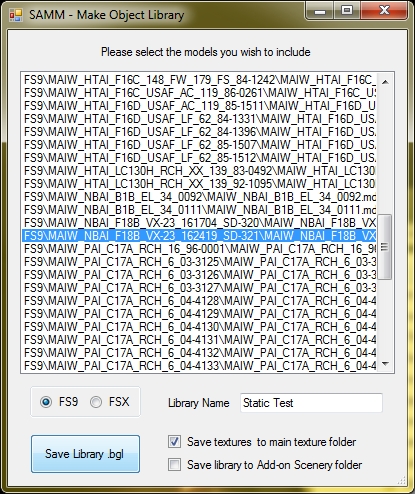
Here is the SAMM window with the textures displayed for a model I just exported to MDL9 using the settings you see in the image (this was one of the dictionary key issue models so I couldn't convert it to FSX).

samm1.jpg


I then created a library for the model using the settings in this image:

samm2.jpg


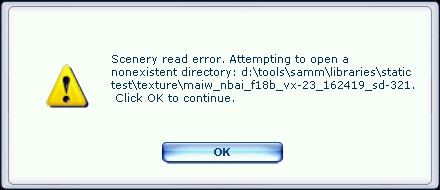
I then loaded up Whisplacer, imported the library and exported the model for Live Preview in FSX. I started up FSX and added the library folder to the Scenery Manager. I loaded up free flight and used Whisplacer to put the item into the scenery which generated this error:

samm3.jpg


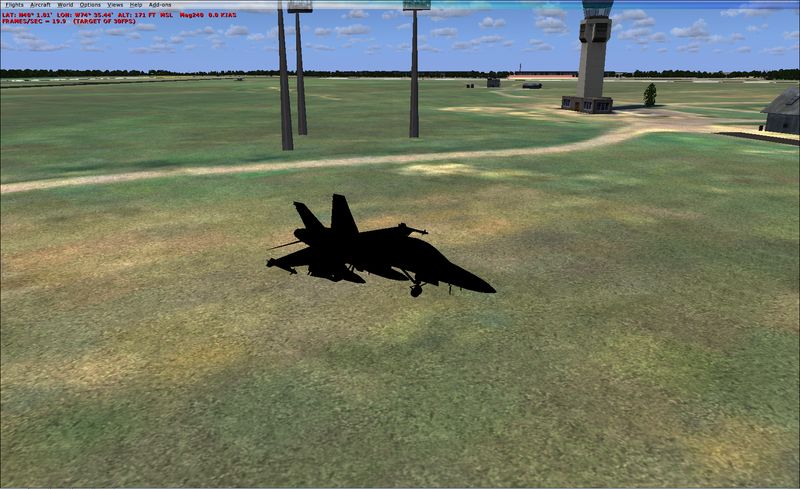
After you select OK it does a fall-back to /scenery/world/texture and then to /texture to try and find the texture before giving up and letting the model load without any textures:

samm4.jpg


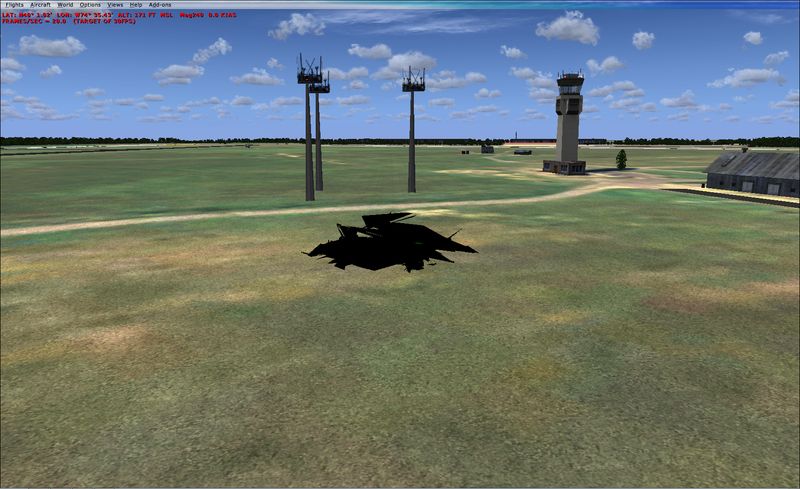
With this model though (and this is a separate issue I know, it just happened to be with this model so figured I'd mention it here) it will only display properly under a certain LOD - once beyond that it turns into this:

samm5.jpg


I've had other models (mostly Nick Black ones) exhibit the same behavior within MCX for those that could be loaded by the program - I would change the LOD and the model would become a mess. Is there a known reason for this Arno?

Thanks guys.
 
Hi,

Got your email and will take a look.

Not sure about the lod. If modelconverterx also shows out like that, it might be in the mdl that way. Or it must be a bug somewhere.

Send from my phone using Tapatalk, so excuse the short sentences and possible typos
 
Thanks Arno - check with the model I sent you the one I showed in the screenshots is a diff texture of the same model I sent you
 
Ok, so it also has the lod issue, great then I can check both.

Send from my phone using Tapatalk, so excuse the short sentences and possible typos
 
Drew, I'll let Arno respond to the LOD issue, other then to say this is not the first time I've seen it. The stock C172 has the same issue - but to a far lesser extent. (The pilot's door is out of place in the close-up LODs.)

Regarding the missing texture issue, this does not appear to be the same issue as I was describing in last year's post; this really is a missing texture issue. I suspect the problem is that Wishplacer doesn't "know" how to use SAMM's standard texture folders. (IS1 doesn't either.) Try checking Save textures to main texture folder when you create the library.

If these are FS9 model aircraft, you might also try using the FS9 static model for FSX. Unless there is night lighting for the model and you elect to use it, the FS9 model will probably be adequate (and a little more efficient).

Don
 
Rats, sorry I guess it's not FSX being nicer on the error reporting huh?

I suspect the problem is that Wishplacer doesn't "know" how to use SAMM's standard texture folders. (IS1 doesn't either.) Try checking Save textures to main texture folder when you create the library.
Check the images again, specifically the second one - what you see are the settings I used when creating the library I exported for use. And I get the same error when I try loading the scenery after placing the object in ADE as well.

If these are FS9 model aircraft, you might also try using the FS9 static model for FSX. Unless there is night lighting for the model and you elect to use it, the FS9 model will probably be adequate (and a little more efficient).
These are indeed FS9 aircraft and this particular model has the "dictionary key issue" that prevents me from converting it to an FSX model so, again as shown in the image, I've exported it as an FS9 static aircraft.

You'll notice I did have night lighting selected when creating the static aircraft. So I should try it without?
 
Sorry, I missed that you had already checked that feature.

I don't use Whisplacer, so I can't comment on it's interaction with SAMM.

However, I notice that you have night textures checked but SAMM does not declare the night textures as being used. This may be the cause of the problem and I'll investigate.

In the meantime, please.

1. Deselect night textures and see if the texture problem goes away, and
2. Try placing the aircraft with SAMMs placement facility to eliminate any Whisplacer interface issues.

Don
 
1. Deselect night textures and see if the texture problem goes away, and
2. Try placing the aircraft with SAMMs placement facility to eliminate any Whisplacer interface issues.
Didn't work I'm afraid. I redid everything as shown in the images posted previously except this time I kept night textures unchecked. Then I compiled the model into a BGL and made sure to put all textures in the same folder.Free flight loaded and at the end up popped the exact same error.

The three files in the texture folder are:
MAIW_NBAI_F18B_VX-23_162419_SD-321%NBAI_FA-18CD_HORNET_T.BMP
MAIW_NBAI_F18B_VX-23_162419_SD-321%NBAI_WEAPONS.BMP
MAIW_NBAI_F18B_VX-23_162419_SD-321%NBAI_WEAPONS2.BMP
 
Please send the aircraft folder (with the desired textures) or a link to it to don at stuff4fs dot com.

Don
 
Drew, the dictionary error message is being issued by Arno's MCX dlls (which are also used by SAMM). The other issues have been fixed in the SAMM Development Release (2.1.00(a).zip) available from http://stuff4fs.com. Please give it a try.

Don
 
I'll be messing around with it more tomorrow but ran it through the process and it loaded fine :)

Hopefully Arno will have similar success with the dictionary key issue.

Regarding the LOD problem is there a way I can get rid of the LODs that are not displaying correctly? Probably using MCX? It might not be good on performance but I'd like to try and see
 
Back
Top