• Which the release of FS2020 we see an explosition of activity on the forun and of course we are very happy to see this. But having all questions about FS2020 in one forum becomes a bit messy. So therefore we would like to ask you all to use the following guidelines when posting your questions:

    • Tag FS2020 specific questions with the MSFS2020 tag.
    • Questions about making 3D assets can be posted in the 3D asset design forum. Either post them in the subforum of the modelling tool you use or in the general forum if they are general.
    • Questions about aircraft design can be posted in the Aircraft design forum
    • Questions about airport design can be posted in the FS2020 airport design forum. Once airport development tools have been updated for FS2020 you can post tool speciifc questions in the subforums of those tools as well of course.
    • Questions about terrain design can be posted in the FS2020 terrain design forum.
    • Questions about SimConnect can be posted in the SimConnect forum.

    Any other question that is not specific to an aspect of development or tool can be posted in the General chat forum.

    By following these guidelines we make sure that the forums remain easy to read for everybody and also that the right people can find your post to answer it.

FSX Error esporting to .MDL file

Messages
22
Country
italy
Hi, dear Arno,

I’m an Italian old boy (81 y.o.), FS fan since Commodore64 an Windows 3.x versions, and I always liked slewing over the towns and discover local monuments provided by MS.
15 years ago I had the good luck to find your wonderful pdf tutorial “Build Your House For FS Using Sketchup” and that changed my life: for a couple of years I continued to build major landmarks in Europe and place them into my personal installation of FSX. Then I had to stop, due to major reasons.

During a recent travel to Casablanca, I was fascinated by the beauty of Hassan II Mosque, so I decided to “try again”... I turned on my old big computer I used 15 years ago (Win XP), ran GoogleSketchUp and build my wonderful model, about 50 polygons and 1 single texture sheet 1024x1024 (see screenshots).

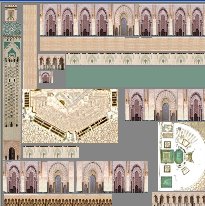
Image.jpg
Image2.jpg


I then exported to COLLADA DAE file, renamed and converted the texture to DDS.
So far, so good!

But when I tried to export to MDL, ModelConverterX stopped and issued a huge list of errors that I could not understand. I attach the Log file.

Arno, you are my last chance! I would be very grateful for any help from you or other members!
 

Attachments

Hi,

Nice looking model!

The error message seems to indicate a DirectX DLL could not be found. Do you have DirectX 9.0c installed on the machine? That's the version that XtoMDL depends on.
 
Thanks for your attention, Arno.
I'm not very expert in such things: how can i know if I have DirectX 9.0c installed and, if not, where can I get the right installation pack?
One thing I forgot to tell before: if I import the Collada in my old version MCX120 I see the picture I posted, but I can'see it if I import to MCX170, even if no problem is isssued in the Log file (produced with MCX170).
I guess, maybe for a scaling problem, I don't see it, but I'm sure it is there, because if I "display normals" I get a nice small porcupine with a lot of red needles... eh eh!
That of course has few to do with the big problem...
Thank you for your help.
 
P.S.
By the way, I'm running MCX170 under Windows10, I changed the decimal separator from commas to points and, following the links you provided during the execution of MCX170, I installed Microsoft .NET framework 4.7.2 and Microsoft Visual C++ 2015-2019 runtime files. I also copied the original SDK folder from my FSX installation on my old WindowsXP pc.
Sorry, maybe I should have written these before!
Thanks again.
 
P.P.S.
I just ran dxdiag and the diagnostic tool says I have DirectX 12 installed on my pc.
Good or bad news?
 
I tried to get the .MDL file done using MCX120 running on my old pc with Windows XP, but I got a similar error log file.
Then I ran dxdiag on the old pc and the diagnostic tool says I have DirectX 9.0c, so it seems that DirectX is not where the problem is.
As a matter of fact, Microsoft says DirectX 12 already contains 9.0c ...
I am desperate!, but I appreciate your good will to help me...
 
Will it actually hurt you if you install it? It will not remove DirectX 12.
 
Ok, tgibson, you are right!
Can you suggest a safe link to download the installer? you know, I'm not an expert of these things, nor really...
 
...I mean, a safe link to download the correct installer... do I need a DirectX End-User Runtimes?
Thanks for your patience.
 
Thanks Tom, I have another download link in ModelConverterX at the moment for when the tool detects that DirectX is missing, but that link is broken. So I'll update it to use this one instead.

I think @enzopag44 is using ModelConverterX 1.7, in that version the check if DirectX is installed is not very robust, I improved that already in the development release. So that it probably why the message with the download link did not trigger.
 
So, my dear friends,
following your advices I installed DirectX 9.0c and that solved the system related part of the problem.
From the Log file 2 that I attach, I think MCX170 actually writes an MDL file.

The problemi s that it seems that my model has all the polygons of 0 lenght.
They exist, as demonstrated by displaying the normals, the “red porcupine” in the screenshot at full zoom, but they are just entities with no dimensions, all concentrated in the axes origin.

Image3.jpg


Let me repeat what I did:

Creation of model: I used GoogleSketchUp v.8, old pc, win XP
Export to Collada: I used GoogleSketchUp v.8, old pc, win XP to create the DAE model and texture
Import of DAE model: If I use MCX120 on the old pc, win XP, I perfectly read the model, as shown in the screenshot I posted in my first message, but if I import the DAE model in MCX170 on my new win 10 pc, I just get the red porcupine… and that hurts me!
It also seems that the DDS texture file is ok, but flipped about horizontal axis, but maybe that’s normal (?)

Do you have any idea of why all that happens?
Thanks for helping me…
 

Attachments

Thanks, I'll check the model on my machine as well. Could you also share the generated mdl file so I can look at that?
 
Hi,

When I load the DAE file in ModelConverterX 1.7 something seems to go wrong with the scaling, as all the vertices have zero coordinates. This is also what I see if I load the MDL file.

If I load the DAE file in the latest development release it does show up as expected. So I guess I have fixed this bug already. Is it possible for you to use the latest development release?
 
Hi Arno, you are great.
I will certainly do that, if you post the link for the latest development release.
I'll never stop thanking you!
P.S. I suppose you suggest to use the development release for producing the MDL file and then go on with MCX170 for the rest of the work. Right?
 
Back
Top