• Which the release of FS2020 we see an explosition of activity on the forun and of course we are very happy to see this. But having all questions about FS2020 in one forum becomes a bit messy. So therefore we would like to ask you all to use the following guidelines when posting your questions:

    • Tag FS2020 specific questions with the MSFS2020 tag.
    • Questions about making 3D assets can be posted in the 3D asset design forum. Either post them in the subforum of the modelling tool you use or in the general forum if they are general.
    • Questions about aircraft design can be posted in the Aircraft design forum
    • Questions about airport design can be posted in the FS2020 airport design forum. Once airport development tools have been updated for FS2020 you can post tool speciifc questions in the subforums of those tools as well of course.
    • Questions about terrain design can be posted in the FS2020 terrain design forum.
    • Questions about SimConnect can be posted in the SimConnect forum.

    Any other question that is not specific to an aspect of development or tool can be posted in the General chat forum.

    By following these guidelines we make sure that the forums remain easy to read for everybody and also that the right people can find your post to answer it.

FS2004 FS9 Seasonal Textures

Messages
42
Country
unitedkingdom
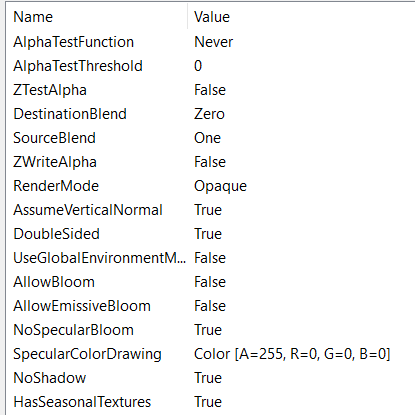
I've been experimenting lately with porting FSX sceneries back to FS9, and a big hurdle to overcome was the inclusion of default FSX objects. I've been trying to make my own personal library of default FSX objects converted back for personal use, but for the life of me I cannot get seasonal textures to work on trees (without using MDLTweaker II, which then breaks the MCX materials!!). Attached are photos of my material settings for batch applying to all trees, alongside the screenshot of defined seasons and what I get in sim. The 'NoShadow' flag doesn't work in FS9 either, all my trees have very rectangular shadows.
1765344800023.png
1765344834368.png

Any help is appreciated, I've found how to get seasonal textures to work with groundpolys but just not individual library objects. Would be nice to get them to stop clipping the alpha channels inside of each other too, an alpha anywhere just clips through the entire object.
Many thanks
 
Hi,

MakeMDL does not support seasonal textures by default. So you will have to manually tweak the FS2004 objects afterwards to get them working. Either by manually editing the ASM files or by using a tool like MDL tweaker.

Which material settings are broken if you use MDL tweaker?
 
Using MDLTweaker I get very see through and shiny trees, things I avoided by using MCX. I'll get a screenshot later to demonstrate. It also doesn't really conform to seasonal boundaries at all, it reflects the sim value (current season being fall) even though in Oslo HW textures are loaded. If I changed season boundaries to reflect the snow in Oslo, it may cause snow to appear elsewhere when there isn't, etc.
 
It's a very long time ago that I made MDL tweaker, so I forgot how I implemented the season check there. But it is likely that it does not match the terrain seasons as they vary based on location. At that moment I don't think I did consider that.

If you are using the same generic trees at different climate zones you would have to make separate models to make sure the seasonal switching matches the climate zone.
 
How would I attach the textures into the asm? Just adding the file names as reference, or would they look for more calls? Hopefully the process can be automated - same with shadow removal.
 
In the last section of that article it refers to changing the materials based on days, but these values must be known. Is there any way to tweak the ASM so that it just relies solely on the mesh, so my objects can work as a global library? If the same tree is placed in both Oslo and Prague, and only Oslo has snow, I’d like this to be reflected.
Secondly, how would I remove shadows?
 
No, you need to load the season bgl in tmfviewer to check the days for a specific region. There is no variable that always matches the terrain scenery.
 
How are you saving the textures? The alpha clipping you are seeing can be due to the use of DXT3 textures (grayscale alpha). I found that can be avoided using DXT1 textures (black/white alpha).
 
Most of the texture properties you list above are not supported by FS9. Use the drop-down box in the material editor and choose FS 2004.

The only way I know to get no shadows in FS9 is to use MDL Tweaker.
 
I have put two issues on the todo list to check mdl tweaker like export without seasons and with seasonal textures again.
 
I use the FSX material menu because a lot of the values have an effect on FS9, especially to do with source blend and alpha values.
It would be nice if MDLTweaker could only edit the shadow and seasonal texture values, because it nullifies all changes to the materials made in MCX. Some feature allowing both tools to be used in conjunction would be nice?
 
MDL tweaker does only make very specific changes to the mdl file. So it will not alter all material settings. But as Tom already said fs2004 does have much less material attributes in its material. Which attributes you think are lost by using mdl tweaker?
 
I've attached a screenshot showing the trees as processed directly from FSX bgl into MCX with my material template applied. The Destination and Source blend, although not in the FS2004 material tree, are crucial in getting a lot of backported objects to work (how I fixed envmap showing on cockpits too), and seemingly here it's the only way to get the alpha applied properly to the trees.
2025-12-10 20_26_23.png


Below, now, is what happens when the exported MCX mdl is put through MDLTweaker II to remove shadows and add seasonal textures. This is also how the material behaves when exported in MCX without applying any special material settings. Changing any alpha values in MDLTweaker doesn't make a change, either. The ONLY fix I had found is to change the Source and Destination blend to as shown in my material template.

2025-12-10 20_40_47.png
 
Let me check if I can see what mdl tweaker does to the material. But it's over 20 years that I last touched that code. It might be mdl tweaker only works on gmax produced mdl files correctly.
 
You happened to reply exactly as I was typing out my reply that I had fixed this 😂
Setting all alpha values to 0, including diffuse, solved it on MDLTweaker. It's all working mostly as intended, except for some of the trees having different shading at seemingly random.
1765435078561.png
 
Glad to see you got it working.

This whole discussion inspired me to move some more MDL Tweaker logic into ModelConverterX. So I have started coding the no shadow tweak in ModelConverterX now already and plan to do the seasonal textures tweak as well. So somewhere in the near future the development release will get these functions.
 
Thanks so much! Glad to see these features come to MCX, I think they’re much needed :)

Do you have any idea why some of the trees have different shading values at random?
 
Back
Top