• Which the release of FS2020 we see an explosition of activity on the forun and of course we are very happy to see this. But having all questions about FS2020 in one forum becomes a bit messy. So therefore we would like to ask you all to use the following guidelines when posting your questions:

    • Tag FS2020 specific questions with the MSFS2020 tag.
    • Questions about making 3D assets can be posted in the 3D asset design forum. Either post them in the subforum of the modelling tool you use or in the general forum if they are general.
    • Questions about aircraft design can be posted in the Aircraft design forum
    • Questions about airport design can be posted in the FS2020 airport design forum. Once airport development tools have been updated for FS2020 you can post tool speciifc questions in the subforums of those tools as well of course.
    • Questions about terrain design can be posted in the FS2020 terrain design forum.
    • Questions about SimConnect can be posted in the SimConnect forum.

    Any other question that is not specific to an aspect of development or tool can be posted in the General chat forum.

    By following these guidelines we make sure that the forums remain easy to read for everybody and also that the right people can find your post to answer it.

MSFS20 FSX BGL Scenery to MSFS Scenery

Messages
2,231
Country
france
Hello everyone! I hope everyone is well!
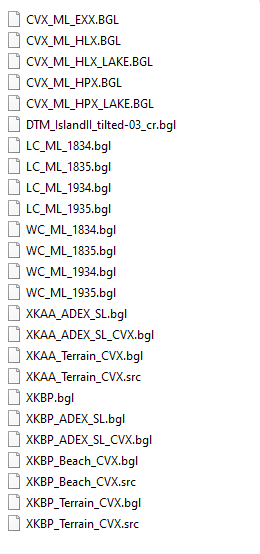
Quick Question, Can we convert FSX BGL scenery to work on MSFS?

I had a Fictional Island on FSX (made my user "AzurePlanet", who made his own island too). I was wondering if I could get it back on MSFS, maybe with the airports I created on it. I would love to continue thats project/dream ;)

Thanks!

1761062457134.png
 
Hello:

Most of that scenery is FSX CVX Vector "Land Class" textures, which by default, will not display in MSFS.

Patrick Germain's CvxExtractor reads CVX BGLs and outputs ESRI *.SHP files.

Those ESRI *.SHP files can be Appended to SBuilderX and then consolidated into (1) *.SHP

A MSFS SDK project can import that ESRI *.SHP file and create Polygon "primitives" in MSFS SDK Scenery Editor.

In MSFS SDK Scenery Editor, Polygon "primitive" manual updates via Polygon Properties dialog assigns MSFS' SDK compatible attributes.

The CVX Vectors from FSX are thereby converted into a format that MSFS SDK Scenery Editor can use.


FSX airports can be imported/ converted into a MSFS SDK compatible airport Project either directly by ADE 2020 Alpha-21.

Otherwise, Patrick Germain's Airport 2 Project can be used to do that.


Generally speaking, most FSX SDK XtoMDL / BGLComp compiled BGLs can be displayed by MSFS without conversion, as discussed here:

https://www.fsdeveloper.com/forum/threads/draw-order-of-gps.460365/post-936480

GaryGB
 
Hey, Thanks for the quick reply!

I did the CVX BGL to SHP, and unified them with SBX, however it gave me 2 SHPs, I don't know if it'll cause a problem. I'l starting MSFS now and I'll give it a try
 
I just found out I have the .TIF file of the island, yet not sure where to go from there, if it's still usefull
 
Hey, Thanks for the quick reply!

I did the CVX BGL to SHP, and unified them with SBX, however it gave me 2 SHPs, I don't know if it'll cause a problem. I'll starting MSFS now and I'll give it a try

Most applications that work with ESRI *.SHP files separate Poly-lines from Polygons.

Doug Matthews of ACES had assured us that SHP2VEC could merge all (3) vector entities into (1) *.SHP-sourced CVX Vector BGL file.

CVX*.BGL files in [FSX_install_path]\Scenery\[Area_#\Scenery sub-folders contain all types of FS CVX Vector types defined in Terrain.Cfg.


I am not certain as to whether the GIS application QGIS, natively- or with a plugin- can merge all (3) vector entities into (1) *.SHP file:

Points (vertices), Poly-lines, Polygons

https://wiki.tuflow.com/QGIS_Shape_Editing

[EDITED]

However, FS2Kx SDK SHP2VEC and AFAIK, MSFS SDK FSPackageTool also ...can consolidate all CVX Vector types together into (1) *.SHP.

It is important during the Append process, that each ESRI *.SHP is imported properly so SBuilderX retains its *.SHP "Attributes".

I describe that SBuilderX ESRI *.SHP Append process in these threads:

https://www.fsdeveloper.com/forum/t...ects-in-sbuilderx-for-katl.444877/post-817582

https://www.fsdeveloper.com/forum/threads/sbuilderx-ft-or-m.437055/post-870360

https://www.google.com/search?q=sit...gH3SXCBwswLjIuMTQuMTcuM8gHwQI&sclient=gws-wiz


You can compare original CVX Vector BGLs in SDK TMFViewer with Appended CVX Vectors in SBuilderX to confirm the 'types' in each file.

https://www.fsdeveloper.com/forum/threads/ground-poly-question.459706/post-931650


https://www.google.com/search?q=sit...xuAefDsIHBzAuMS42LjbIB28&sclient=gws-wiz-serp


A somewhat recent MSFS thread discusses apparent issues with FS2Kx-format vector "Holes" in imported ESRI *.SHP files:

https://www.fsdeveloper.com/forum/t...ygons-from-sbuilderx-qgis-etc-in-msfs.451812/

[END_EDIT]

GaryGB
 
Last edited:
I just found out I have the .TIF file of the island, yet not sure where to go from there, if it's still useful.

A *.TIF file might be the visible "diffuse" aerial image, but could also be either a Land-Water Mask or Blend mask ...for a custom PR LC BGL.

You may wish to open the *.TIF in a graphics application (...as SDK ImageTool does not open TIF's) to see what its Raster image contains.

MSFS already provides zoom level-21 aerial imagery, so one may not need to make a replacement custom PR LC BGL.

GaryGB
 
Last edited:
Back
Top