• Which the release of FS2020 we see an explosition of activity on the forun and of course we are very happy to see this. But having all questions about FS2020 in one forum becomes a bit messy. So therefore we would like to ask you all to use the following guidelines when posting your questions:

    • Tag FS2020 specific questions with the MSFS2020 tag.
    • Questions about making 3D assets can be posted in the 3D asset design forum. Either post them in the subforum of the modelling tool you use or in the general forum if they are general.
    • Questions about aircraft design can be posted in the Aircraft design forum
    • Questions about airport design can be posted in the FS2020 airport design forum. Once airport development tools have been updated for FS2020 you can post tool speciifc questions in the subforums of those tools as well of course.
    • Questions about terrain design can be posted in the FS2020 terrain design forum.
    • Questions about SimConnect can be posted in the SimConnect forum.

    Any other question that is not specific to an aspect of development or tool can be posted in the General chat forum.

    By following these guidelines we make sure that the forums remain easy to read for everybody and also that the right people can find your post to answer it.

FSX Ground poly question?

Messages
20
Country
croatia
Hello...

Now the idea is to make photoreal ground poly.. This airport is made of 4 type of asphalt.. So want to make 4 planes like on picture... Now.. can I make it with coordinates for every point of plane... (they look something like this E = 483306.9, N = 4821706.9 | φ = 43.5351, λ = 16.293458)... So that I have real position of apron and runway... and with planes separately made... texture them to be photoreal...


Untitled_2.png
 
Not that I know of. You could use a background image in your 3D program though and specify a known point as the 0,0,0 point. Then since you know the coordinates of that point, you can place the entire object precisely. You could do this with separate polygons, although there is no real reason to do that - it could all be one polygon textured with a single bitmap with the 4 asphalt areas drawn in the texture.
 
Ok... Hi guys!!

I made planes... somthing like i picture 1... And now.. I want to merge them to be one... but to have this kind layout of segments in plane...?! What is best way to do it?

picture.jpg


Maby this picture will be better to show what I want to do :)

picture2.jpg
 
Hm... thanks! But on picture 2 there are 2 planes... how to combine them in one? Now I can not select segment between two points :confused:
 
Use the Slice Plane to slice the polygon that will be making the L shape. Use the tool twice to create the unwanted rectangle in the inside of the "L". Delete that unwanted polygon.

That should be all you need to do - they don't have to be one part (and in fact that makes the texturing more complex).

If you really want to combine parts together, here's how. Choose one plane and choose Attach List from the right panel. Choose the other plane. Now they are one part. Now select the vertices that are at the common points between the two polygons. Choose Weld Selected, with a distance setting that is rather small, but is large enough to ignore any small position errors (~0.1', but can be as small as 0.01' if you were accurate with the Slice Plane).

Now you have a single monolithic part.

Hope this helps,
 
For my idea, I think you should separate to only two type of surfaces by its material, asphalt and concrete. You can use lines and draw on the background image. Draw it as detail as you can the close it. After that you can convert it into polygon. Don't use plane since you will have problem matching those square plane to the real thing. Then you apply the materials and mapping in detail to those two parts.
Then you use satellite image to overlay those two surfaces. The shade of satellite photo will either darken or brighten two surfaces of concrete and make it different. You will get detail of the surfaces and you will get the uneven surfaces, non-repeated texture from far above as well.


vtbs2012-3.jpg


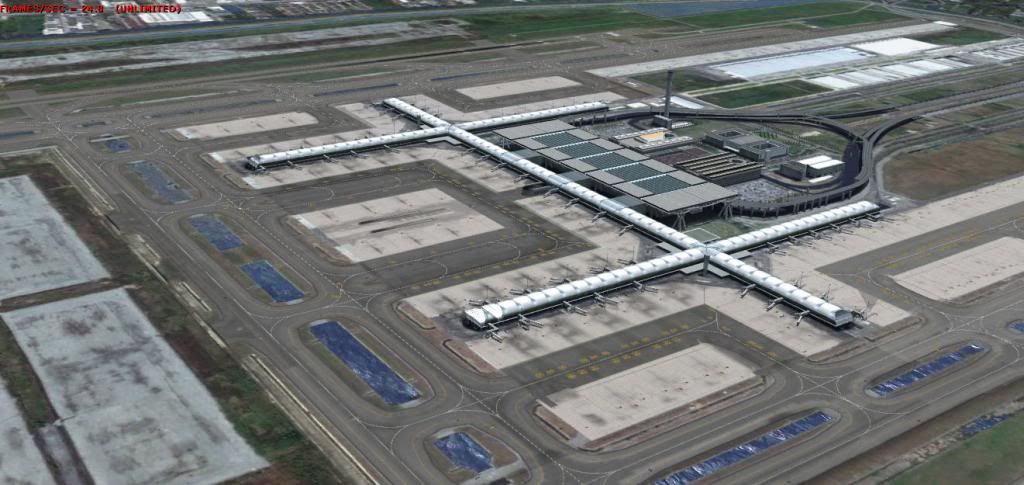
Please take a look at this one. I only use asphalt and concrete texture ( concrete is default one from AFCAD) then I overlay with satellite photo. You will get less drawcall than making specific texture for one surface.
 
Last edited:
Hello... again :rolleyes:

Have this stupid problem... it is about texturing edge of runway.. Made plane along runway...
Picture will be better help to explane... :)

See... want to apply this part of texture to that plane... But have this problem,
how to multiple part of texture along plane... I try but it is streched... like on picture 2...

Picture 1:

picture_1.jpg


Picture 2:

picture_2.jpg


Thanks :o
 
You cannot tile textures that do not stretch from one edge of the texture to the other edge. You must use your yellow rectangle *plus* the rectangle to its right, and tile the entire width.

Hope this helps,
 
Try to select entire width of texture... but same thing, now just it is duble size... And still strech...

So this is how I do it...

- Select plane and go to Material Editor and pick texture and aply
- Go to Unwrap UVW and apply Lenght and Width...
- Go to UVW Mapping, edit... and then scale texture in Edit UVW...

And still dosent work :(

Texture is just strech... maby only way is to devide plane in small segments and then texture them each separately :(
 
Dear EnzoCro,
I think if you try to do this, we will end up with endless questions and answers.
You should go to some nice tutorials in the internet or you can begin modelling with the tutorial in gmax gamepack fs2004 or use gmax tutorial file at turbosquid.com http://www.turbosquid.com/gmax. You don't need to make a model related to flightsim but any models you can learn something more. Repeat texture is the one I learnt from this tutorial. You don't need tiles to make it repeat along its length of texture.

I made a plane with 3 segments on the width of the plane.
01-7_zps2ddc5bf6.jpg


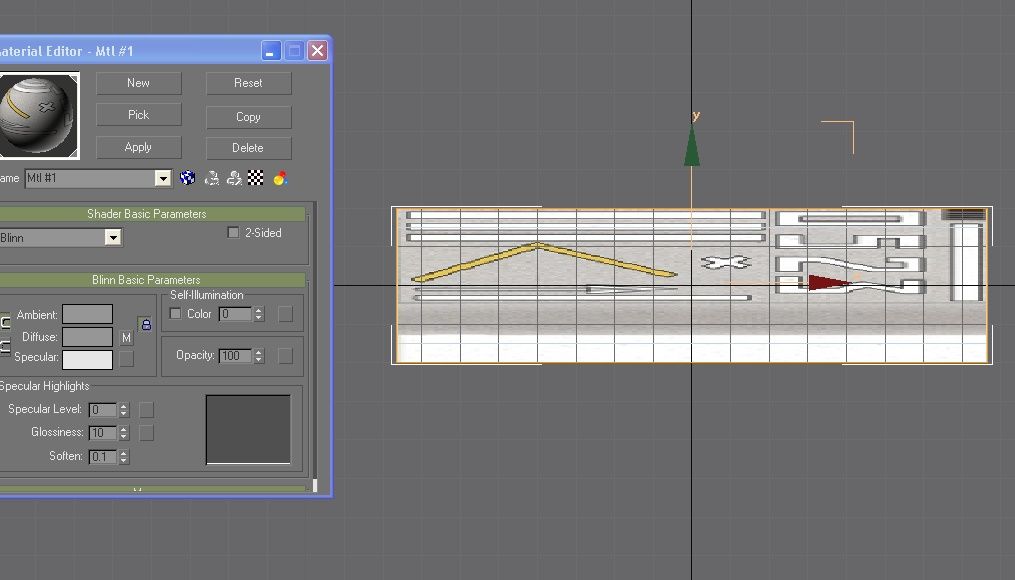
Then I use your texture to map on the plane
02-6_zps5f30f909.jpg


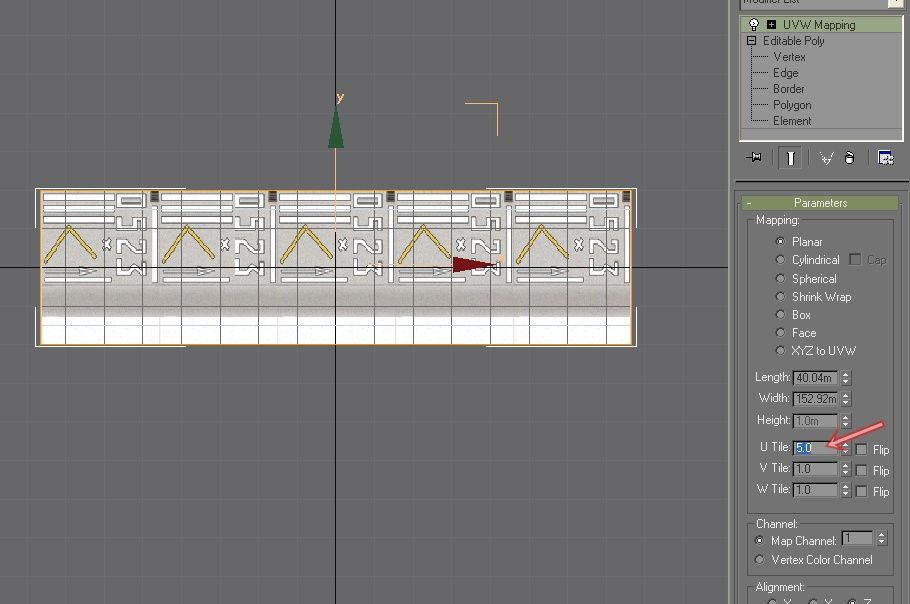
Put number on the box I indicated, you will see how the texture repeat itself along the length. You can put number to make it repeat along its width as well.
03-5_zpsa5e2cbdd.jpg


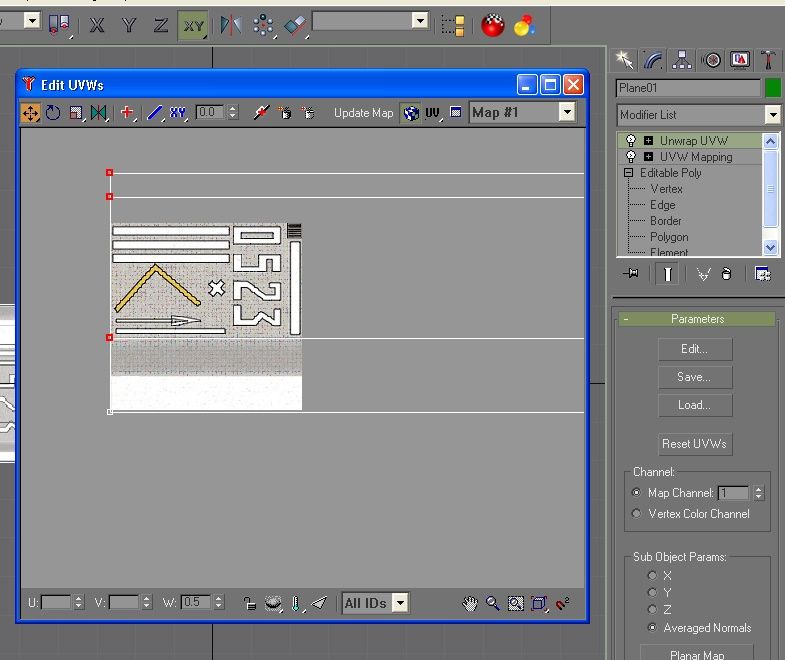
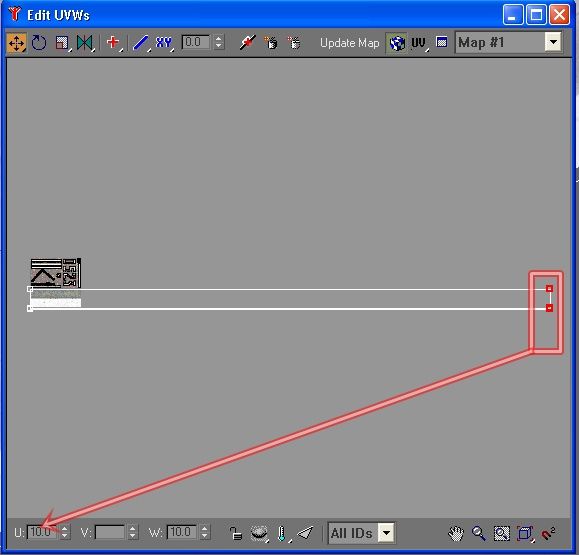
Unwrap it and see how it is. The vertex of the texture is stretch far beyound the boundary of the texture. That is how it repeat itself on the length.
04-4_zps163a2f4a.jpg


Now you can adjust the vertex of the edge of runway. If you see that the texture is not repeated enough, you can add more repetition by adding more numbers to the vertex. Number 0 is the left corner of the texture, number 1 is the right edge of it. So, if you put 10 to it the texture will be repeated 10 times.
05-3_zps5e03c2fc.jpg


Now I'm done with the edge. Texture does not look stretching as yours.
06-3_zpsfe1f435a.jpg


I'm sorry if my answer irritate you but please take my advice. Go to turbosquid.com and download their tutorial. You will learn a lot while doing the models and examples that they provided.

If you keep asking, we will end up with hundreds of mini-tutorials like this one.

Of course, it takes time before you master and understand all the method of making model in Gmax. But be patient, scenery designing is not easy and lots of projects are abandoned along its development.
Regards,
 
Last edited:
Back
Top