

- Messages
- 205
- Country

Dear all,
I have another question here I'm struggling with at some point I cannot understand why?
It should be possible to pass a GPS variable value to a LVar isn't? I recall have seen it be done in several examples with way points etc...but I'm trying to do a stupid thing and I don't manage to understand why it doesn't workout for me. There is that blinking yellow "msg" you usually find in the GPS when you cross airspace etc, and I want to have it display in my PFD (and eventually close it as well) without having to open the GPS.
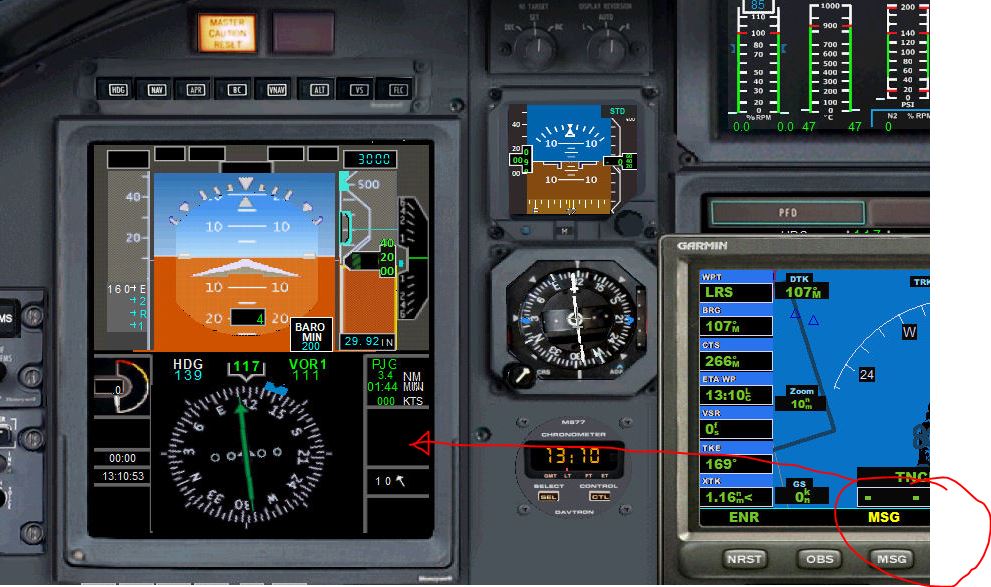
Looking true the GPS code I found two variables that I believe might contain the values needed that trigger this msg in the GPS which I want to pass to a LVar to rigger this in the PFD.
At start of the GPS_500.XML file I see the following for :
Further down I found also 2 other variables:
(@c:NewMessagesNumber) and (@MSGToggle)
So I try to pass the values from all of them but so far without any luck which makes me now believe that most probably I dont understand how that works or Im doing something wrong?
This is part of my script in the <Update> section of the PFD where I try to pass the values:
Any advice for me?
I have another question here I'm struggling with at some point I cannot understand why?
It should be possible to pass a GPS variable value to a LVar isn't? I recall have seen it be done in several examples with way points etc...but I'm trying to do a stupid thing and I don't manage to understand why it doesn't workout for me. There is that blinking yellow "msg" you usually find in the GPS when you cross airspace etc, and I want to have it display in my PFD (and eventually close it as well) without having to open the GPS.
Looking true the GPS code I found two variables that I believe might contain the values needed that trigger this msg in the GPS which I want to pass to a LVar to rigger this in the PFD.
At start of the GPS_500.XML file I see the following for :
Code:
<Gauge Name="GPS_500" Version="1.0">
    <Image Name="gps_500_background.bmp"/>
    <!-- local vars
        activateLeg                - 1=display activate leg popup, 0=hide activate leg popup
        blinkingField            - 1-based index of field that is blinking, 0 if no blinking
        blinkingFieldEnabled1    - bool to indicate whether field is available for cursor scrolling/blinking
        blinkingFieldEnabled2    - "
        blinkingFieldEnabled3    - "
        blinkingFieldSaved        - saved when going from one blinking screen to another to blink correct field on close
        currentGroup            - 0=nav, 1=wpt, 2=nrst, 3=fpl, 4=proc
        currentPageNAV        - current sub-page for page group 0
        currentPageWPT        - "                               1
        currentPageNRST        - "                               2
        currentPageFPL        - "                               3
        menuBlinker
        messagePopup            - 1=display message popup, 0=hide message popup
Further down I found also 2 other variables:
(@c:NewMessagesNumber) and (@MSGToggle)
So I try to pass the values from all of them but so far without any luck which makes me now believe that most probably I dont understand how that works or Im doing something wrong?
This is part of my script in the <Update> section of the PFD where I try to pass the values:
Code:
<!-- Macros -->
<Macro Name="c">C:fs9gps</Macro>
<Macro Name="g">C:fs9gps</Macro>
<Macro Name="MSGToggle">(@g:messagesOff) ! (>@g:messagesOff)</Macro>
<Update>
(@MSGToggle) (>L:gps_test01,bool)
(@c:NewMessagesNumber) 0 >
(@c:messagePopup) 0 > or if{ 1 (>L:msg_on,bool) } els{ 0 (>L:msg_on,bool) }
</Update>Any advice for me?


 crazy it is..