
-
Which the release of FS2020 we see an explosition of activity on the forun and of course we are very happy to see this. But having all questions about FS2020 in one forum becomes a bit messy. So therefore we would like to ask you all to use the following guidelines when posting your questions:
- Tag FS2020 specific questions with the MSFS2020 tag.
- Questions about making 3D assets can be posted in the 3D asset design forum. Either post them in the subforum of the modelling tool you use or in the general forum if they are general.
- Questions about aircraft design can be posted in the Aircraft design forum
- Questions about airport design can be posted in the FS2020 airport design forum. Once airport development tools have been updated for FS2020 you can post tool speciifc questions in the subforums of those tools as well of course.
- Questions about terrain design can be posted in the FS2020 terrain design forum.
- Questions about SimConnect can be posted in the SimConnect forum.
Any other question that is not specific to an aspect of development or tool can be posted in the General chat forum.
By following these guidelines we make sure that the forums remain easy to read for everybody and also that the right people can find your post to answer it.
You are using an out of date browser. It may not display this or other websites correctly.
You should upgrade or use an alternative browser.
You should upgrade or use an alternative browser.
P3D v4 P3DV4......let us know how it goes
- Thread starter pinkjr
- Start date


- Messages
- 259
- Country

Jon, the latest beta of ADE works well with P3Dv4. I no longer get the ID 62 error! I also installed the latest AD-GP.
UPDATE: Call off the dogs!..Cockpit error here. I think I pulled my head out of the "dark place" and figured out the MDLs had to have "footprints". At least that is the last thing I tried from ADE and now have the detailed footprints for the MDLs.
Sorry for the 911.
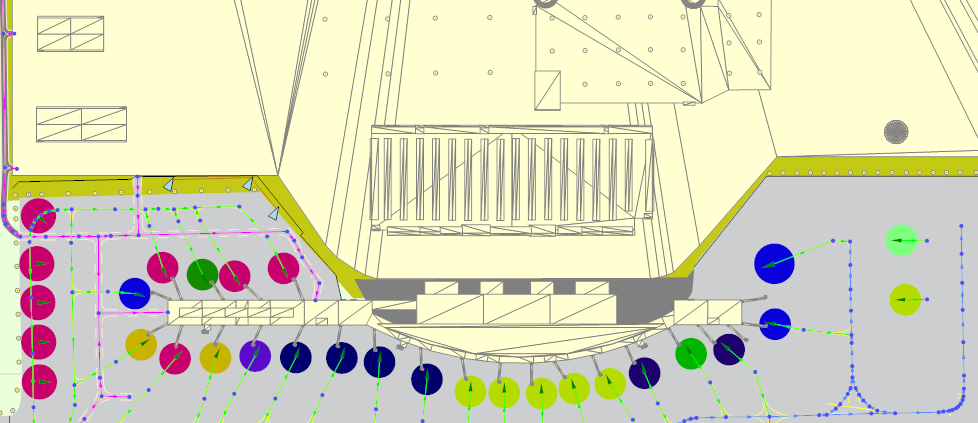
However, most of my custom MDLs now appear in ADE with no detail, just squares or rectangles. I had this same problem after installing ADE 171 with the P3Dv34 support, I corrected it..BUT I cannot remember what I had to change to allow ADE to show the MDL detail such as the outline, etc. I have attached 2 pics...both of the same airport and MDL..one with and one without any detail. What the heck have I done wrong? Forgotten to do?
Thanks in advance...the mind is a terrible thing to loose.

UPDATE: Call off the dogs!..Cockpit error here. I think I pulled my head out of the "dark place" and figured out the MDLs had to have "footprints". At least that is the last thing I tried from ADE and now have the detailed footprints for the MDLs.
Sorry for the 911.
However, most of my custom MDLs now appear in ADE with no detail, just squares or rectangles. I had this same problem after installing ADE 171 with the P3Dv34 support, I corrected it..BUT I cannot remember what I had to change to allow ADE to show the MDL detail such as the outline, etc. I have attached 2 pics...both of the same airport and MDL..one with and one without any detail. What the heck have I done wrong? Forgotten to do?
Thanks in advance...the mind is a terrible thing to loose.
Last edited:


- Messages
- 34,981
- Country

You are using a version of ADE that does not support P3D v4. You need to use version 1.75
- Messages
- 66
- Country

If I open an airport created with ADE 1.75 for FSX and then compile it for P3D4, all GP lines are misaligned in P3D v4.1.
If I use the compiled FSX version in P3D4, all GP lines are ok.
If I use the compiled FSX version in P3D4, all GP lines are ok.

Rosario, this is a known (but user avoidable) issue with Pv4. It happens with long lines and when one line is to connect exactly with some portion of another. It is caused by straight lines being perfectly straight but applied to a round earth.If I open an airport created with ADE 1.75 for FSX and then compile it for P3D4, all GP lines are misaligned in P3D v4.1.
You can largely avoid the situation by making long lines as a series of shorter ones and placing a node in a line where another is meant to intersect it.
As I stated in another recent post, I am surprised FSX GPs display properly in PV4. LM advertised it was removing the technology for P3D that supported this capability. I've never tried it, but soon will. In the meantime, if you are happy with the Pv4 presentation of the FSX GPs, use them.If I use the compiled FSX version in P3D4, all GP lines are ok.
Don
- Messages
- 259
- Country
Don, I am a little confused. Does this problem happen with "existing" GP lines in FSX that are simply recompiled in P3Dv4.1 or and/or GP lines that are "created" with ADE 1.75 and then compiled with the latest P3Dv4.1 compiler/SDK? Reason I ask is that I have not had any such problems with long GP lines that I have created (see the screen shot of the taxiway at the south end of 35R at KDFW, which I am in the process of totally reworking and hope to release it in 1Q2018 (I have to get KAUS released on both P3Dv3 and V4.1 first). I have also not seen the problem you describe with my KAUS work, but then the lines created there are not as long as those in the attached pic of KDFW.Rosario, this is a known (but user avoidable) issue with Pv4. It happens with long lines and when one line is to connect exactly with some portion of another. It is caused by straight lines being perfectly straight but applied to a round earth.
You can largely avoid the situation by making long lines as a series of shorter ones and placing a node in a line where another is meant to intersect it.
As I stated in another recent post, I am surprised FSX GPs display properly in PV4. LM advertised it was removing the technology for P3D that supported this capability. I've never tried it, but soon will. In the meantime, if you are happy with the Pv4 presentation of the FSX GPs, use them.
Don
What have I missed??
Lemon
Attachments

Lemon, I noted above "It happens with long lines and when one line is to connect exactly with some portion of another". To clarify, I should have said "... when one line is intended to connect or intersect ... By "long Lines", I'm referring to lines in the order of 1000+ (simulated) feet - not to suggest it couldn't happen with shorter lines. Your hold-short line doesn't qualify nor does it connect or intersect with any other line.
ADE "knows" nothing about whether a GP is "new" or "existing". The issue will only appear with Pv3+. It can be avoided by having the compiler use its FSX mode (selection on GP compiler dialog).
Don
ADE "knows" nothing about whether a GP is "new" or "existing". The issue will only appear with Pv3+. It can be avoided by having the compiler use its FSX mode (selection on GP compiler dialog).
Don
- Messages
- 259
- Country
Excellent, thank you for the detail, I appreciate it very much.Lemon, I noted above "It happens with long lines and when one line is to connect exactly with some portion of another". To clarify, I should have said "... when one line is intended to connect or intersect ... By "long Lines", I'm referring to lines in the order of 1000+ (simulated) feet - not to suggest it couldn't happen with shorter lines. Your hold-short line doesn't qualify nor does it connect or intersect with any other line.
ADE "knows" nothing about whether a GP is "new" or "existing". The issue will only appear with Pv3+. It can be avoided by having the compiler use its FSX mode (selection on GP compiler dialog).
Don