
-
Which the release of FS2020 we see an explosition of activity on the forun and of course we are very happy to see this. But having all questions about FS2020 in one forum becomes a bit messy. So therefore we would like to ask you all to use the following guidelines when posting your questions:
- Tag FS2020 specific questions with the MSFS2020 tag.
- Questions about making 3D assets can be posted in the 3D asset design forum. Either post them in the subforum of the modelling tool you use or in the general forum if they are general.
- Questions about aircraft design can be posted in the Aircraft design forum
- Questions about airport design can be posted in the FS2020 airport design forum. Once airport development tools have been updated for FS2020 you can post tool speciifc questions in the subforums of those tools as well of course.
- Questions about terrain design can be posted in the FS2020 terrain design forum.
- Questions about SimConnect can be posted in the SimConnect forum.
Any other question that is not specific to an aspect of development or tool can be posted in the General chat forum.
By following these guidelines we make sure that the forums remain easy to read for everybody and also that the right people can find your post to answer it.
You are using an out of date browser. It may not display this or other websites correctly.
You should upgrade or use an alternative browser.
You should upgrade or use an alternative browser.
Runway marker numbers
- Thread starter Butch1
- Start date

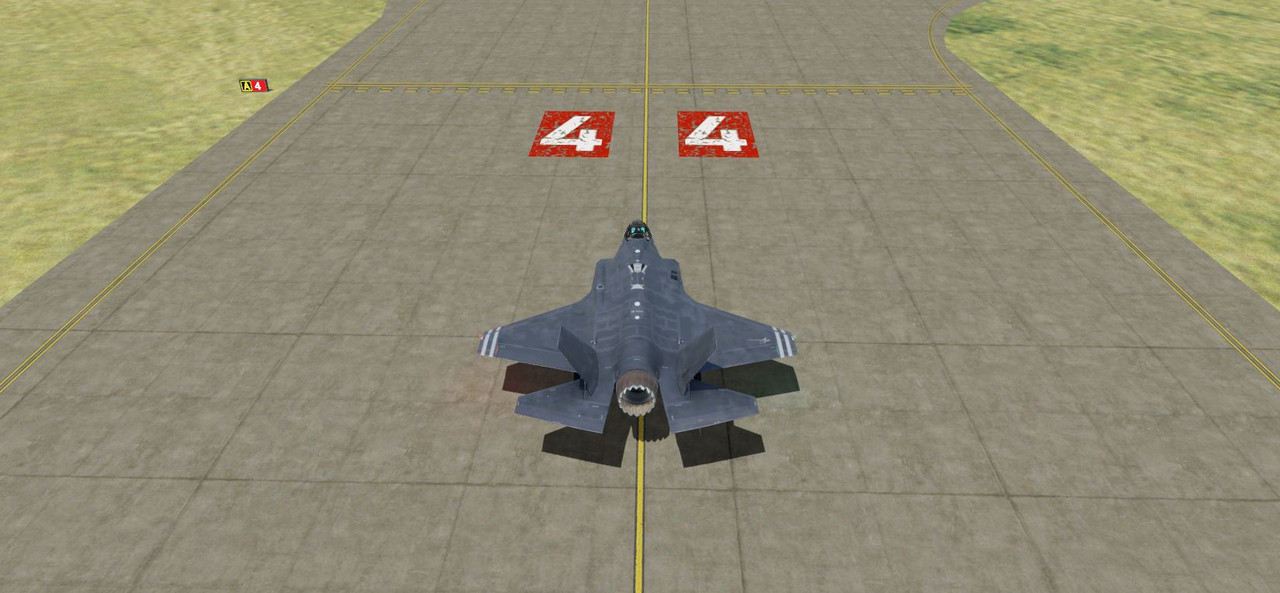
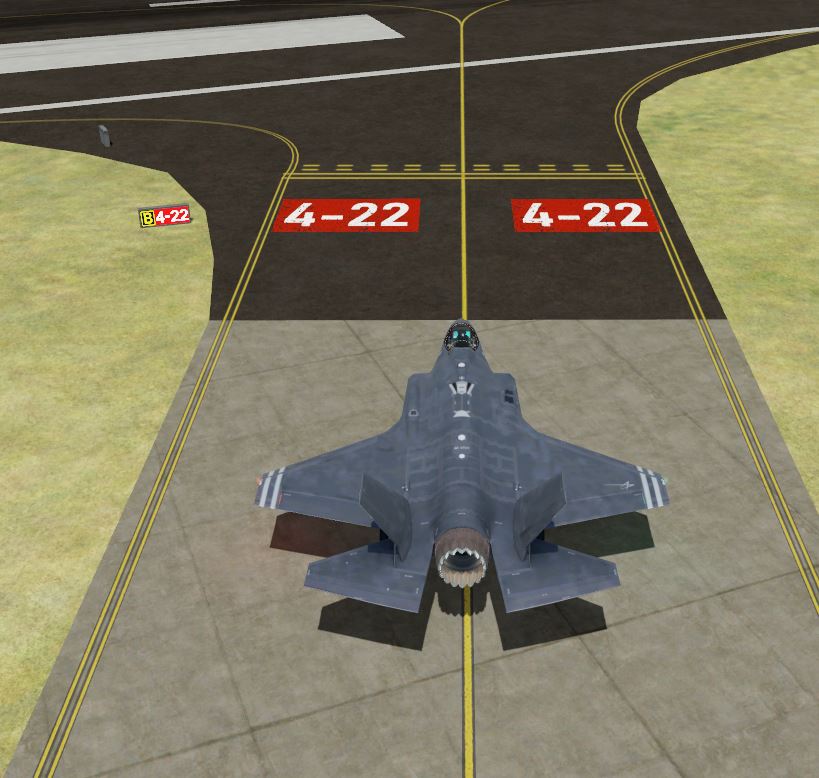
I stumbled on to a possible solution. It looks like X-Plane has a program (WED) that will easily accommodate this function and it's free but of no use for P3D.
You'd think someone would of followed suit with P3D. But. I did find an older post that covered this topic.
https://www.fsdeveloper.com/forum/threads/surface-painted-taxiway-direction-signs.443957/
You'd think someone would of followed suit with P3D. But. I did find an older post that covered this topic.
https://www.fsdeveloper.com/forum/threads/surface-painted-taxiway-direction-signs.443957/
Last edited:

This guy shows you how using ADE https://www.youtube.com/c/Soarflyconcepts/videos
I think its this video
I think its this video

Here Look at the screenshot
Instead of adding this yellow hold short line ( 1 ) you add your numbers ( 2 )
You then apply them like he does in the rest of the video.
You draw a line and make it 6 meters wide instead of the 2 for a taxi line
I'm not sure is could be any easier
Instead of adding this yellow hold short line ( 1 ) you add your numbers ( 2 )
You then apply them like he does in the rest of the video.
You draw a line and make it 6 meters wide instead of the 2 for a taxi line
I'm not sure is could be any easier
Attachments


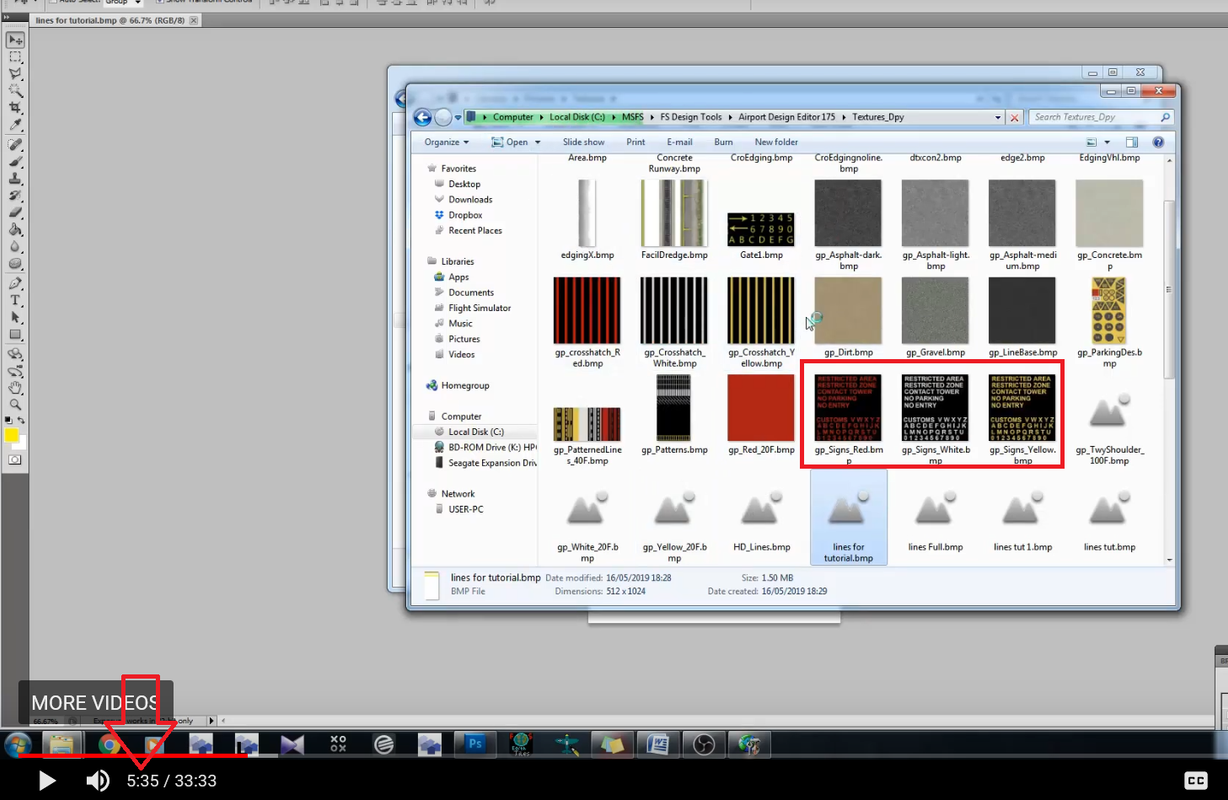

I think I found that sheet of numbers/letters in the \MSFS\FS Design Tools\Airport Design Editor 179 Test\Textures_Dpy_Base
Notice in my first post the red white numbers and they have a bit of a worn look. Curious how that effect was achieved.
I think part of this numbers equation has been explained but what wasn't brought to light (AFAIK) is the crafting of the runway numbers needed for your runway then
subsequent placement in locations of your runway. In ADE, I do not see the runway numbers like in my first post when I open the appropriate BGL. Why is that?
Notice in my first post the red white numbers and they have a bit of a worn look. Curious how that effect was achieved.
I think part of this numbers equation has been explained but what wasn't brought to light (AFAIK) is the crafting of the runway numbers needed for your runway then
subsequent placement in locations of your runway. In ADE, I do not see the runway numbers like in my first post when I open the appropriate BGL. Why is that?
Last edited:
I ask the question of the person that made this video if he would share how to add marker numbers - He said he hasn't yet but plans on doing so.
So as of now,,,, no videos yet from this source - which goes back to my original statement where he did not show how this was done but states he will in future videos.
So as of now,,,, no videos yet from this source - which goes back to my original statement where he did not show how this was done but states he will in future videos.
Last edited:
You did tell me in your own way and point taken. I don't want to make a federal case out of it. I was just making light that the dude didn't mention how to add runway numbers and he told
me in a reply comment in his video that he would be making one. There are other Utube videos on the subject of ADE usage and some of them go into in depth coverage on all aspects of
using ADE. In retrospect, a bit of extra extracurricular graphic editor knowledge and skill is a prerequisite to complete certain objectives. I started off this post asking how to add runway markers, You supplied
a video telling me that what I was interested in was in that video. Technically, it wasn't and the author of the video concurs that he didn't mentioned it but would in a later video. I will give credit
where it is due and I appreciate your info.
Over an out!!
me in a reply comment in his video that he would be making one. There are other Utube videos on the subject of ADE usage and some of them go into in depth coverage on all aspects of
using ADE. In retrospect, a bit of extra extracurricular graphic editor knowledge and skill is a prerequisite to complete certain objectives. I started off this post asking how to add runway markers, You supplied
a video telling me that what I was interested in was in that video. Technically, it wasn't and the author of the video concurs that he didn't mentioned it but would in a later video. I will give credit
where it is due and I appreciate your info.
Over an out!!
Last edited:

I load LPPS Porto Santo, Portugal Airport from FSX, P3Dv4 and P3Dv5 and then sim sees runway number 01 - 19 are supposed to be 18 - 36. I checked AFCAD and the numbers are correct, 18 - 36. But, the sim shows from the scenery listing the LPPS to select runway 01 or 19.
I don't see any needs to fix runway numbers if they are correct. Any ideas?
Pat
I don't see any needs to fix runway numbers if they are correct. Any ideas?
Pat
Writing again to find if now anyone can give me a hint.
I load LPPS Porto Santo, Portugal Airport from FSX, P3Dv4 and P3Dv5 and then sim sees runway number 01 - 19 are supposed to be 18 - 36. I checked AFCAD and the numbers are correct, 18 - 36. But, the sim shows from the scenery listing the LPPS to select runway 01 or 19.
I don't see any needs to fix runway numbers if they are correct. Any ideas?
Pat
I load LPPS Porto Santo, Portugal Airport from FSX, P3Dv4 and P3Dv5 and then sim sees runway number 01 - 19 are supposed to be 18 - 36. I checked AFCAD and the numbers are correct, 18 - 36. But, the sim shows from the scenery listing the LPPS to select runway 01 or 19.
I don't see any needs to fix runway numbers if they are correct. Any ideas?
Pat

tgibson
Resource contributor
- Messages
- 11,854
- Country

Is it 1-19 in the go to airport menu, or only the numbers displayed on the runway surface?
If the former, your ADE file is not being read by the sim. Make sure that you have the compiled BGL file in an active scenery, and make sure there are no other BGL files for that airport in a higher scenery folder as listed in the scenery library.
If the latter, then there is probably an addon airport present that is using custom ground polygons to display those numbers.
Note that if you have ORBX scenery for this area people often have problems updating the airports.
If the former, your ADE file is not being read by the sim. Make sure that you have the compiled BGL file in an active scenery, and make sure there are no other BGL files for that airport in a higher scenery folder as listed in the scenery library.
If the latter, then there is probably an addon airport present that is using custom ground polygons to display those numbers.
Note that if you have ORBX scenery for this area people often have problems updating the airports.
Just fixed minutes ago, the AFCAD with ADE and here it is working as expected.Is it 1-19 in the go to airport menu, or only the numbers displayed on the runway surface?
If the former, your ADE file is not being read by the sim. Make sure that you have the compiled BGL file in an active scenery, and make sure there are no other BGL files for that airport in a higher scenery folder as listed in the scenery library.
If the latter, then there is probably an addon airport present that is using custom ground polygons to display those numbers.
Note that if you have ORBX scenery for this area people often have problems updating the airports.
Pat