• Which the release of FS2020 we see an explosition of activity on the forun and of course we are very happy to see this. But having all questions about FS2020 in one forum becomes a bit messy. So therefore we would like to ask you all to use the following guidelines when posting your questions:

    • Tag FS2020 specific questions with the MSFS2020 tag.
    • Questions about making 3D assets can be posted in the 3D asset design forum. Either post them in the subforum of the modelling tool you use or in the general forum if they are general.
    • Questions about aircraft design can be posted in the Aircraft design forum
    • Questions about airport design can be posted in the FS2020 airport design forum. Once airport development tools have been updated for FS2020 you can post tool speciifc questions in the subforums of those tools as well of course.
    • Questions about terrain design can be posted in the FS2020 terrain design forum.
    • Questions about SimConnect can be posted in the SimConnect forum.

    Any other question that is not specific to an aspect of development or tool can be posted in the General chat forum.

    By following these guidelines we make sure that the forums remain easy to read for everybody and also that the right people can find your post to answer it.

MSFS24 Custom Aerial Imagery and Photogrammetry

Christian Bahr

Resource contributor
Messages
1,137
Country
germany
Hello, maybe someone has some advice.

The image shows how the photogrammetry overlaps with my own airport aerial imagery:

msfs24_photogrammetry_blending.jpg


In the Project Inspector, the option "Custom Airport" was set under "Package order hint":
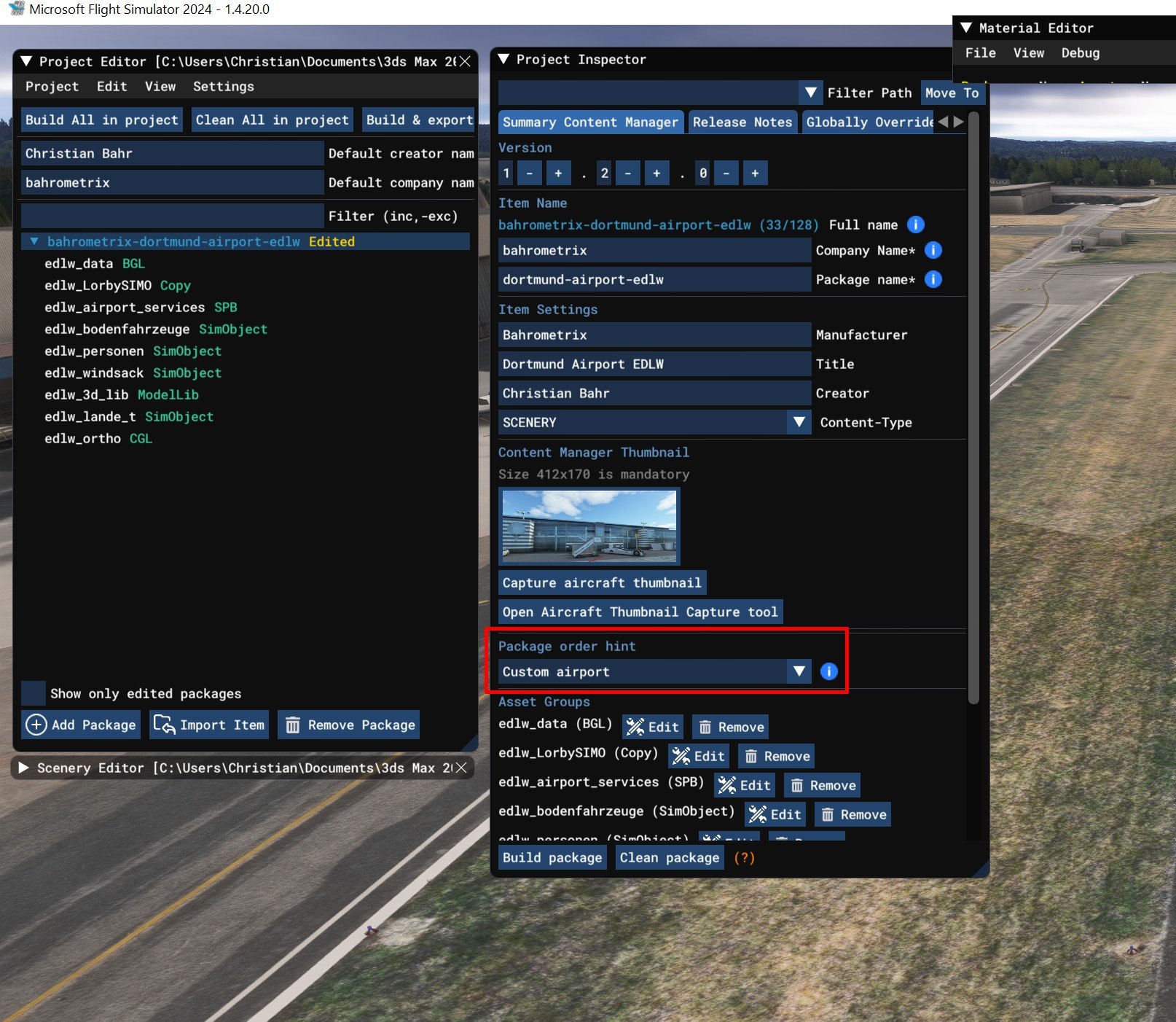
package_order_hints.jpg


If I turn off photogrammetry, this "transparency" disappears again. The airport is Dortmund Airport EDLW (freeware), but this effect can also be observed at other airports with a custom aerial image in photogrammetry areas. For example, EDDL Duesseldorf. It affects the entire airport area, including areas where no transparent apron textures exist.
 
I can confirm that photogrammetry and aerial imagery (CGL) are incompatible. I made a quick aerial of EDDL, and the photogrammetry does interfere.
EDDL-Photogrammetry.png


With no photogrammetry:
No_Photogrammetry.png


Photogrammetry enabled, but with a large NoTin polygon applied to the airport:
Photogrammetry with NoTin polygon.png


The downside is with a NoTin applied, that might not be what the Developer wants. There is supposed to be a fix when SU3 is released. So no polys would be needed to exclude the TIN (Photogrammetry).

Note: the project is compiled and placed in the Community folder. Otherwise the aerial won't display.
 
One more thing. Let's say you have a package with an aerial already released. And now you get complaints about the photogrammetry interfering with the aerials. I made a package to just patch the area as NoTin. Added to the Community, it works to suppress the Photogrammetry and allows the previous package to display the aerial. This should work to patch Marketplace addons as well as just Community addons.
 

Attachments

I've already tried that. The polygon with TIN exclusion was the first thing I tried. The photogrammetry doesn't just consist of the aerial photograph; it also contains the scanned elevation data. Even if I exclude the photogrammetry aerial photograph, the elevation data remains. And that ruins my entire terrain. I'll take a few pictures, then you'll see what I mean.
The terrain of Dortmund Airport has a pronounced gradient/elevation profile that I'd like to retain. But I'll gladly try again; maybe it will still work. Thanks for your support.
 
Hi Christian:

Would you please explain what you meant by:

"The photogrammetry doesn't just consist of the aerial photograph; it also contains the scanned elevation data. Even if I exclude the photogrammetry aerial photograph, the elevation data remains."

Thanks, I would like to better understand the workflow used at that location.

GaryGB
 
As far as I know, photogrammetry consists of 2D images and a 3D scan of the Earth's surface - you get aerial imagery and elevation data (simply explained). But I'm open to being proven wrong.

@rhumbaflappy I promised to take some pictures.
The following images show a) the aerial imagery and b) the elevation data. The aerial imagery is new and unprocessed (not retouched). The elevation data comes from the MSFS24 itself. This is very accurate 1m LIDAR scan data. This is the "bare" elevation data from the sim, unprocessed by me. It is so accurate that hardly any adjustments to the terrain were necessary. Only the runway has its own elevation profile.

msfs_edlw_terrain_1.jpg
msfs_edlw_terrain_2.jpg

Image 1: This is the elevated "General Aviation Terminal" area. Image 2: The ramp from Runway 06 to the terminal.

msfs_edlw_terrain_3.jpg
msfs_edlw_terrain_4.jpg

Image 3: the lower part of the GAT. Image 4: Illustration of the Asobo/Microsoft Terrain data (LIDAR 1m scan data)

msfs_edlw_terrain_5.jpg

Engine test area

The images were taken without photogrammetry.


With photogrammetry enabled, the terrain looks like this:

msfs24_edlw_terrain_pg_1.jpg
msfs24_edlw_terrain_pg_2.jpg

The GAT area and the engine test area with PG

As a final test, I tried, like Dick, creating a polygon with TIN exclusion. To be clear, it didn't work:

msfs24_edlw_terrain_pg_exlude_tin_1.jpg
msfs24_edlw_terrain_pg_exlude_tin_2.jpg

The TIN-Exclusion-Polygon has approximately the same dimensions as the aerial image, but as you can see, this didn't help. The PG aerial image shines through, and the PG elevation data is not excluded.

With TIN-Exclusion-Polygon and restarting MSFS24 didn’t change anything either:
msfs24_edlw_terrain_pg_exlude_tin_4.jpg


My conclusion: Photogrammetry influences custom aerial imagery and the LIDAR scan data.
For me, it remains to be seen that the TIN-Exclusion-Polygon cannot exclude either the PG aerial imagery or the PG elevation data. Perhaps I'm just making a mistake somewhere. But where?
 
This issue is supposed to be fixed in the upcoming SU3: https://devsupport.flightsimulator.com/t/su1-beta-graphic-bugs-with-cgl-imagery/13257

I have been trying the work-around with the Exclude Tin polygon, but that doesn't appear to work for me in Dortmund, so we will have to wait and see. We're all trapped in the evolving Beta of the Asobo-Microsoft-MSFS rushed releases. They do not give us a finished product, then change the rules after 3rd party addons are releases. Hopefully SU3 will be the last of the changes to scenery.
 
If it can be of any help; try to add a terraforming tile; usually those block tin from showing.

Indeed; I would develop Dortmund using Terra-Forming, and NOT use photogrammetry at all; with it on, Dortmund really "Rocks". :duck:

MSFS_2024_Photogrammetry_ON_Dortmund_This_Scenery_Rocks-1.jpg


Do we not all have more pressing matters that demand our time, other than inspecting / excluding / replacing "Rock-Trees" ? :oops:

That is not a time-saver, IMHO. ;)

I think Asobo has more pressing matters than solving consequences of enabling their Photogrammetry; their object derivation is flawed.


GaryGB
 

Attachments

  • FSX_Scenery_Cfg_Area_Layer_Fresh_Install_Ultimate_Alaska_X_.jpg
    FSX_Scenery_Cfg_Area_Layer_Fresh_Install_Ultimate_Alaska_X_.jpg
    98.7 KB · Views: 133
  • MSFS_2024_Photogrammetry_ON_Dortmund_This_Scenery_Rocks-1.jpg
    MSFS_2024_Photogrammetry_ON_Dortmund_This_Scenery_Rocks-1.jpg
    740.1 KB · Views: 142
Last edited:
If it can be of any help; try to add a terraforming tile; usually those block tin from showing.
That's a good idea, thanks. But where do I get a "terraforming tile"?
Did you mean a rectangle with the terraforming option enabled, or perhaps a polygon with the terraforming option enabled, or a height map?
I've tried all three, but it doesn't help, or rather, the terrain distortions get even worse.

terraforming_tile_1.jpg


terraforming_tile_2.jpg
 
With Foxtrotscenery program: essentially the mesh it make is nothing else than a terraforming; what it offer; is the ability to make it with elevation models; rather than using the sdk to edit the terrain by pulling up or down / left or right/ use the elevation model to shape the terrain; yes it might not be ideal as is a long way round; but this will exclude any photogrammetry of covered area. The resulting project i believe should also be editable into the sdk if you need to shape further. My opinion is do not wait for Misobo to fix anything as it might never happen; or waiting ages before it get done.

 
With Foxtrotscenery program: essentially the mesh it make is nothing else than a terraforming; what it offer; is the ability to make it with elevation models; rather than using the sdk to edit the terrain by pulling up or down / left or right/ use the elevation model to shape the terrain; yes it might not be ideal as is a long way round; but this will exclude any photogrammetry of covered area. The resulting project i believe should also be editable into the sdk if you need to shape further. My opinion is do not wait for Misobo to fix anything as it might never happen; or waiting ages before it get done.

Okay, I wasn't familiar with that tool. But I'll be happy to give it a try. I'm curious to see if it works in MSFS24 :)
 
Hi, just a quick update.

The problem resolved itself with the SU3. Everything is now displayed as it should be, and the ground no longer shows through when photogrammetry is enabled.

The tool is really good; you can achieve very good results with it for elevation data. Thanks for the tip :-)
 
Back
Top