

Hi,
I am trying to use a custom sheet of marking and use an apron to "pick" the good asset.
Like the one used/provide by Asobo.
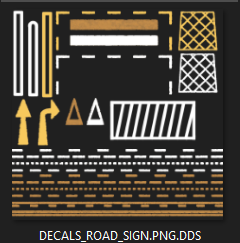
It is kind of difficult to deal with.
Do you have any advice for this kind of situation?
I played with Local UV, UV tiling option of the apron's option but did not get any good result.
I was thinking of using a bunch of projectedMesh for each assets but it is a heavy process. Plus, it looks like there are still the problem with the SDK and multiple projectedMeshes.
(edit) I just found this similar thread.
 www.fsdeveloper.com
I am trying to use a custom sheet of marking and use an apron to "pick" the good asset.
Like the one used/provide by Asobo.
It is kind of difficult to deal with.
Do you have any advice for this kind of situation?
I played with Local UV, UV tiling option of the apron's option but did not get any good result.
I was thinking of using a bunch of projectedMesh for each assets but it is a heavy process. Plus, it looks like there are still the problem with the SDK and multiple projectedMeshes.
(edit) I just found this similar thread.
MSFS - Ground marking UV manipulation
Hey, I am trying to put some ground parking marks. The issue is the texture sheet contains all numbers and letter and when I apply the texture into an apron polygon , there is no convinient way to adjust what part of the texture should be projected on the polygon. Any ideas?
www.fsdeveloper.com