
-
Which the release of FS2020 we see an explosition of activity on the forun and of course we are very happy to see this. But having all questions about FS2020 in one forum becomes a bit messy. So therefore we would like to ask you all to use the following guidelines when posting your questions:
- Tag FS2020 specific questions with the MSFS2020 tag.
- Questions about making 3D assets can be posted in the 3D asset design forum. Either post them in the subforum of the modelling tool you use or in the general forum if they are general.
- Questions about aircraft design can be posted in the Aircraft design forum
- Questions about airport design can be posted in the FS2020 airport design forum. Once airport development tools have been updated for FS2020 you can post tool speciifc questions in the subforums of those tools as well of course.
- Questions about terrain design can be posted in the FS2020 terrain design forum.
- Questions about SimConnect can be posted in the SimConnect forum.
Any other question that is not specific to an aspect of development or tool can be posted in the General chat forum.
By following these guidelines we make sure that the forums remain easy to read for everybody and also that the right people can find your post to answer it.
You are using an out of date browser. It may not display this or other websites correctly.
You should upgrade or use an alternative browser.
You should upgrade or use an alternative browser.
Dictionary key error
- Thread starter Gaiiden
- Start date


- Messages
- 34,468
- Country

Hi,
I haven't checked the file yet. Out small baby and the fact that I had a wisdomtooth removed this week delay me a bit. hopefully in a few days.
Modelconverterx can remove lods, it's done in the lod creator form.
Send from my phone using Tapatalk, so excuse the short sentences and possible typos
I haven't checked the file yet. Out small baby and the fact that I had a wisdomtooth removed this week delay me a bit. hopefully in a few days.
Modelconverterx can remove lods, it's done in the lod creator form.
Send from my phone using Tapatalk, so excuse the short sentences and possible typos
Arno, why do you let these little things distract you from your fans?Our small baby and the fact that I had a wisdomtooth removed this week delay me a bit.

Congratulations on the baby; not so much on the wisdom tooth.
Don
- Messages
- 34,468
- Country
Hi,
Oh, I am quite happy the wisdom teeth is gone as well, that will save me toothache in the future. It's only a big annoying now .
.
I had a look at this error now, but I am a bit confused. Drew, the MDL you send me is that the original one or one modified by SAMM already? Does the original MDL give the same error?
The error occurs because when setting a texture an index is given to a subtexture. So the index of a reflection texture, but not to the main diffuse texture that that reflection texture belongs to. As far as I know that is not valid for the MDL file, although it seems FSX does not complain.
As a workaround, I can try to use the nearest diffuse texture in this case.
Oh, I am quite happy the wisdom teeth is gone as well, that will save me toothache in the future. It's only a big annoying now
.I had a look at this error now, but I am a bit confused. Drew, the MDL you send me is that the original one or one modified by SAMM already? Does the original MDL give the same error?
The error occurs because when setting a texture an index is given to a subtexture. So the index of a reflection texture, but not to the main diffuse texture that that reflection texture belongs to. As far as I know that is not valid for the MDL file, although it seems FSX does not complain.
As a workaround, I can try to use the nearest diffuse texture in this case.
- Messages
- 34,468
- Country
Hi,
The work around for the texture worked. But I got another error now. This time a vertex is used in a triangle, but the index to the vertex is more than the amount of vertices defined. I think this is also related to the messy LODs. Something is going on here.
So once again the question is this the original file before any tweaking? Then I can hopefully find out why the vertices seem messed up.
The work around for the texture worked. But I got another error now. This time a vertex is used in a triangle, but the index to the vertex is more than the amount of vertices defined. I think this is also related to the messy LODs. Something is going on here.
So once again the question is this the original file before any tweaking? Then I can hopefully find out why the vertices seem messed up.
Arno, I've uploaded the original aircraft folder to http://stuff4fs.com/Applications/SAMM/Downloads/MAIW_NBAI_F-18B-D_NAS Patuxent River.zip.
Drew was using VX-23_162419_SD-321, i.e., [Fltsim.05].
Don
Drew was using VX-23_162419_SD-321, i.e., [Fltsim.05].
Don

Gaiiden
FSDevConf team
- Messages
- 751
- Country

Appreciate the help guys. You're on track - I sent you the SAMM static model Arno and gave a link to Don for the original files, which I see he's passed to you so all good there.
Good to know though that as a last resort I can just dump the other LODs if I really want to keep the model and it doesn't drag performance too much
I'm not sure what you mean here when you refer to "the problem". The LOD issue is both an FS9 and FSX issue - I've seen models that I've converted to FSX be destroyed at all but one LOD just like the image I posted previously, which was of an FS9 model (recall that was one I couldn't convert due to the error Arno is investigating)But, you only have the problem when you attempt to convert the FS9 aircraft model into an FSX scenery model. Why not leave it as a FS9 scenery model?
Good to know though that as a last resort I can just dump the other LODs if I really want to keep the model and it doesn't drag performance too much
Drew, I hadn't appreciated that the LOD problem affected both FS9 and FSX (though if I'd read your initial post more carefully, I would have). Since that's the case, the problem has nothing to do with Arno's dlls.
I've just tried SAMM 1.1.16 and it throws an exception with that model - which is very unusual and had not previously been reported. So, it would appear the current problem originates with SAMM1 but manifests itself differently in SAMM2. I'll investigate.
Arno, re your findings of yesterday, i.e., that there's a texture configuration problem in the static model, I'm still a little confused. Could you try explaining it once again. In fact, since the technical details are not likely of interest to SAMM users, perhaps we should continue this discussion via e-mail.
Don
I've just tried SAMM 1.1.16 and it throws an exception with that model - which is very unusual and had not previously been reported. So, it would appear the current problem originates with SAMM1 but manifests itself differently in SAMM2. I'll investigate.
Arno, re your findings of yesterday, i.e., that there's a texture configuration problem in the static model, I'm still a little confused. Could you try explaining it once again. In fact, since the technical details are not likely of interest to SAMM users, perhaps we should continue this discussion via e-mail.
Don
It appears that this aircraft uses a different design technique from most other FS9 aircraft. It appears to have individual vertex buffers for each LOD (which I don't recall seeing before), and so SAMM doesn't (yet) "know" how to handle that.
Fixing this could take a while.
Don
Fixing this could take a while.
Don
- Messages
- 34,468
- Country
Hi Don,
I'll hopefully take a look again tonight. I'll email you my findings.
Modelconverterx should support multiple vertex buffers, but still something is wrong.
Send from my phone using Tapatalk, so excuse the short sentences and possible typos
I'll hopefully take a look again tonight. I'll email you my findings.
Modelconverterx should support multiple vertex buffers, but still something is wrong.
Send from my phone using Tapatalk, so excuse the short sentences and possible typos
Sorry, Arno. I assumed you had already downloaded it so had removed it from the server. It's back up.
http://stuff4fs.com/Applications/SAMM/Downloads/MAIW_NBAI_F-18B-D_NAS Patuxent River.zip.
Don
http://stuff4fs.com/Applications/SAMM/Downloads/MAIW_NBAI_F-18B-D_NAS Patuxent River.zip.
Don
- Messages
- 34,468
- Country
With the original model I do not get the error for the material and also the LODs display fine. So it seems to be something that SAMM did with the model. I'll discuss this in more detail with Don offline.
SAMM version 2.1.00(b) fixes the LOD problem as well as the texture indexing problem noted by Arno. (SAMM 2 did "know" how to handle multiple vertex buffers. The problem was that I destroyed the vertex buffer index before I got around to using it.)
SAMM 2.1.00(b) is available as the SAMM Development Release from http://stuff4fs.com.
The "missing dictionary item" problem when attempting to convert FS9 static models to FSX still exists. Arno and I are working on it.
Don
SAMM 2.1.00(b) is available as the SAMM Development Release from http://stuff4fs.com.
The "missing dictionary item" problem when attempting to convert FS9 static models to FSX still exists. Arno and I are working on it.
Don
Gaiiden
FSDevConf team
- Messages
- 751
- Country
Success here as well with the latest dev release - I was able to create a B1B static model for FSX and load it up fine in the sim with textures looking good and no LOD corruption I've seen before with this model. Good stuff!! If I come across any more issues I will let you know
Look forward to hearing more about the dictionary key - the FSX models have less of a texture footprint than the FS9 ones so would like to have all the models in FSX if I can.
A little digression - I've noticed that when I convert a model from FS9 to FSX the model still shows up in the FS9 list when I go to create a library. This means if I create a bunch of FS9 and FSX models (as I would be forced to do now due to the conversion issue with some models) I can create a library of FSX-only models easily but I can't easily create a library of just the FS9 models I didn't convert to FSX because all the models I created are listed for FS9 models. Did that make sense?
Look forward to hearing more about the dictionary key - the FSX models have less of a texture footprint than the FS9 ones so would like to have all the models in FSX if I can.
A little digression - I've noticed that when I convert a model from FS9 to FSX the model still shows up in the FS9 list when I go to create a library. This means if I create a bunch of FS9 and FSX models (as I would be forced to do now due to the conversion issue with some models) I can create a library of FSX-only models easily but I can't easily create a library of just the FS9 models I didn't convert to FSX because all the models I created are listed for FS9 models. Did that make sense?
Gaiiden
FSDevConf team
- Messages
- 751
- Country
Dictionary key issue gone for me
Hold the presses!! Hey Don can you run through the model setup I had in the video in the original post with your latest dev build? I was going through with AIFP to find all the aircraft textures I will need to convert to static models for placement just to see which ones I needed to wait for on the dictionary key fix and as I was going I was surprised at never hitting a problem after 7 models or so. So I went back to a model I knew had a problem (the model from the video) and - it worked! Well, SAMM did generate this error:
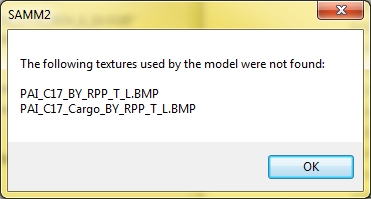
But it only told me this on first creation - if I changed a model pose or something and re-saved the MDL I didn't get any error box. I saved the FSX model to a library, placed it using ADE and it looked perfect in the sim!
If I find any dictionary key models I'll let you know, still a couple traffic files to go through, but looks good so far...
Hopefully you and Arno can nail down what went right in the latest dev build - my own dev experience has taught me there's nothing worse than a problem that fixes itself...
Hold the presses!! Hey Don can you run through the model setup I had in the video in the original post with your latest dev build? I was going through with AIFP to find all the aircraft textures I will need to convert to static models for placement just to see which ones I needed to wait for on the dictionary key fix and as I was going I was surprised at never hitting a problem after 7 models or so. So I went back to a model I knew had a problem (the model from the video) and - it worked! Well, SAMM did generate this error:
But it only told me this on first creation - if I changed a model pose or something and re-saved the MDL I didn't get any error box. I saved the FSX model to a library, placed it using ADE and it looked perfect in the sim!
If I find any dictionary key models I'll let you know, still a couple traffic files to go through, but looks good so far...
Hopefully you and Arno can nail down what went right in the latest dev build - my own dev experience has taught me there's nothing worse than a problem that fixes itself...
Gaiiden
FSDevConf team
- Messages
- 751
- Country
Alright I finished going through all the flight plans. I created a static version of almost every model that flies into KWRI and did not get a single dictionary key error for any of them when converting to FSX.
I say almost every model because two aircraft titles were too long to be model names, but although SAMM told me so (multiple times - I clicked OK through three error boxes in succession) the model name box remained greyed out and I was unable to shorten the model name so I could save it.
I also came across the missing textures error a total of 6 times.
After I get some sleep I will export all the individual models and make sure they appear properly in the sim.
Also heads up that I'm noticing a lack of poses with these models... I try saving them with no reverse thrusters, or canopies open, etc, and they always show up the same (reverse thrusters deployed, canopies closed, etc) in the MCX view. Will open a separate thread if I do find it to be an issue within the sim.
Also a note that when saving the FSX models with the MCX preview open (whether a new model or re-saving a model) I always have to press the Reset View button in MCX for the program to allow me to manipulate the camera and sometimes even view the new model
I say almost every model because two aircraft titles were too long to be model names, but although SAMM told me so (multiple times - I clicked OK through three error boxes in succession) the model name box remained greyed out and I was unable to shorten the model name so I could save it.
I also came across the missing textures error a total of 6 times.
After I get some sleep I will export all the individual models and make sure they appear properly in the sim.
Also heads up that I'm noticing a lack of poses with these models... I try saving them with no reverse thrusters, or canopies open, etc, and they always show up the same (reverse thrusters deployed, canopies closed, etc) in the MCX view. Will open a separate thread if I do find it to be an issue within the sim.
Also a note that when saving the FSX models with the MCX preview open (whether a new model or re-saving a model) I always have to press the Reset View button in MCX for the program to allow me to manipulate the camera and sometimes even view the new model
We've discovered that the dictionary error is due to the suppression of night textures (where they exist). Hopefully we'll find a solution to this.I created a static version of almost every model that flies into KWRI and did not get a single dictionary key error for any of them when converting to FSX.
Just noticed this myself. Should be simple to fix.(multiple times - I clicked OK through three error boxes in succession) the model name box remained greyed out and I was unable to shorten the model name so I could save it.
Let me have a look first and get back to you. Please tell me the name of a model that demonstrates this problem.I try saving them with no reverse thrusters, or canopies open, etc, and they always show up the same (reverse thrusters deployed, canopies closed, etc) in the MCX view. Will open a separate thread if I do find it to be an issue within the sim.
Looks like you are the beta tester I was looking for a month or so ago.
Re the View issue, I hope Arno is "listening". It would probably help if you gave us a set of specific steps to reproduce the probelm
Don