• Which the release of FS2020 we see an explosition of activity on the forun and of course we are very happy to see this. But having all questions about FS2020 in one forum becomes a bit messy. So therefore we would like to ask you all to use the following guidelines when posting your questions:

    • Tag FS2020 specific questions with the MSFS2020 tag.
    • Questions about making 3D assets can be posted in the 3D asset design forum. Either post them in the subforum of the modelling tool you use or in the general forum if they are general.
    • Questions about aircraft design can be posted in the Aircraft design forum
    • Questions about airport design can be posted in the FS2020 airport design forum. Once airport development tools have been updated for FS2020 you can post tool speciifc questions in the subforums of those tools as well of course.
    • Questions about terrain design can be posted in the FS2020 terrain design forum.
    • Questions about SimConnect can be posted in the SimConnect forum.

    Any other question that is not specific to an aspect of development or tool can be posted in the General chat forum.

    By following these guidelines we make sure that the forums remain easy to read for everybody and also that the right people can find your post to answer it.

Blender LOD instructions?

I will test today and report. Thank you.
I am also learning more about what the LOD numbers mean. I have determined that you can edit the .xml file values, save the file, re-export that LOD only and immediately click back to the sim to see the result. This saves a lot of time.
I am making my lowest LOD model of my bridges from simple plane objects with projected views from five sides. This gives me a final LOD that has no more than one to a few quads. The textures are then set to alpha Dither and double-sided. Here is where the albedo tint becomes important: there is a wide difference between how the colors appear in Blender and how they appear in the sim. I am hoping the display problem is fixed with 0.40.2.5. The added slider sounds good.
Again, thank you for the help.
Sorry I'm no help with the Python and modern coding; I date from the middle 60s and Project MAC. My last programming was done in C and early C++.
 
Hmmm, did this thread get hijacked? Nothing personal, but still looking for instructions on how to do & export LOD's for P3D / FSX using Blender. I'm specifically making airport buildings and have NO issues making the models and exporting, but don't understand how to export LOD's. Also, does EACH model get it's own "empty"(?), I've successfully made and exported many hangars into FSX / P3D without any "empties" attached to the model, but recently read somewhere that you need them? (Wonder why I've never seen that in any tutorial I've watched?) I've been down and out a bit lately and haven't been following this thread, but it seems to have gone askew.

I need simple instructions, even if I have to PM someone to ask specific questions. PLEASE do not refer me to some lengthy documentation where I have to struggle through each step to understand what is expected of me. A step by step procedure is remarkably beneficial and helps to understand the order and placement of each step.
Thanks all!

TB2
 
Not a problem. As I said, I’ve been out of sorts for awhile. Trying to get my mojo back. Thanks!
 
I'm revisiting this, mostly in the hopes that someone can guide me through the process. I've been unavailable for some time now, and need to finish this project.

To rehash, I'm looking for "detailed" instructions on how to make use of LOD's in P3D (v4 and 5) when exporting using Blender.

I already can create models, (Blender 2.93), textures etc. and export them into FSX / P3D successfully. What I don't know is "parenting" (if necessary), and creating / exporting LOD's.

I have created a hangar, in 3 models, one high detail, one medium and one low. I tried following a YouTube video "[013] Varying Model Levels Of Detail - Microsoft Flight Simulator 2020 SDK Tutorials" and that makes sense, but that particular tutorial is for MSFS and when I export my model in Blender, the results are not the same.

Also, when I export my model, I select "export animations and LOD" but nothing seems to change. I do not get any LOD's even though I'm exporting all 3 models at the same time.

I'm using MCX (latest development version) to verify the integrity of the model(s), but it does not contain any LOD's and seems to only have the high res model.

UPDATE I am able to get LOD's to work by creating several models, various detail levels, then using MCX, and LOD Creator, import those at various LOD's. This works nicely, BUT,
I need to know what the correlation with the LOD numbers are in In LOD Creator. I specifically need to be able to tweak it so that when the aircraft is about 100 yards away, (NOT 1/4 mile away) it changes to lower LOD.

Of course, if there is an easier way, ANY help would be greatly appreciated!

Thanks,
TB2
 
Last edited:
When a particular LOD becomes active is defined in the model.xml file.

Code:
<?xml version="1.0" ?>
<ModelInfo guid="{9ed4aa14-9af0-0e1d-eaae-4c334d07aefe}" version="1.1">
    <LODS>
        <LOD ModelFile="yourmodel_LOD00.gltf" minSize="75"/>
        <LOD ModelFile="yourmodel_LOD01.gltf" minSize="25"/>
        <LOD ModelFile="yourmodel_LOD02.gltf" minSize="10"/>
        <LOD ModelFile="yourmodel_LOD03.gltf" minSize="0"/>
    </LODS>
</ModelInfo>

minSize = percent of vertical screen height [visible when larger than]
 
That's one answer I've been looking for! Thanks for your reply!

Hate to sound ignorant, but when is the model.xml file created and where can it be found? I can't seem to find it! I've looked at the compiled file from Blender, not there, and the compiled model from MCX, not there either.

TB2
 
The model.xml file is created when exporting from Blender with the Blender2MSFS plugin. Be sure to check the "Generate/Append SML file" option.
Latest version I know of [0.40.2.6] is in this thread: https://fsdeveloper.com/forum/threa...n-color-multipliers.450272/page-3#post-885562
wiki from the original [0.40] is at: https://www.fsdeveloper.com/wiki/index.php?title=Blender2MSFS

FYI, the batch LOD export (another checkbox) often does not work properly. However, you can use it create the multi-LOD model.xml. Frankly, though, it can be easier just to copy an existing file, replace with your correct file name and most importantly replace the GUID with a new & unique one (https://www.guidgenerator.com/)

Some general information about model development: https://www.fsdeveloper.com/forum/threads/primer-to-3d-asset-creation-for-msfs.448401/, but probably supplement with discussions in this forum.

And, of course, there is the SDK documentation https://docs.flightsimulator.com/html/index.htm#t=Asset_Creation/3D_Models/LoDs.htm
 
Thank you "dale in cda", but as stated above, I'm creating models for P3D v5.

According to the Blender2MSFS Wiki, it is incompatible with P3D/FSX.

If the same can be done with Blender2FSXP3D (0.98.21) I'd like to know.
 
Just to, I hope, help out here: I've been using LODs for quite a while now, and the mystery of the meaning of the "minsize" puzzled me until I 1) read that the sim computes a sphere around your model and measures the sphere's size in some unit value, and 2) you can view the value by selecting Options-Debug LODs-Display External Models LOD from the Dev menu bar. Now, with your model selected (white rectangular volume) you can zoom in and out and note the value in the overlaid display. You will now see something like: ‘LOD[0,1] Size[73.45]’. The first numbers in brackets are the current LOD (numbered from 0), a comma and then another integer showing the number of LODs available for this model. If you have only one LOD, it will show a 1. The LOD is like a fence between showing one model and the next model. The minsize, therefore, does not necessarily depend on distance; rather, I think it depends on the "enclosing volume". Since I make long, narrow bridges, I end up using large numbers for the minsize. Smaller, more compact structures will require a different set of values for the same distance. I'm certain this is probably the case with P3D also. You turn off the LOD value viewer by going to the same menu and unchecking that line.
HTH I know this isn't specific to P3D, but it may help.
 
Ok, I'll give that a go. Since it's not specific to P3D, I can assume (yes, I know) that your description is for MSFS? If so, it may or may not "work" for P3D. (running into that a bit).

I'll update eventually.

TB2
 
It seems that after the last update, the LOD tuning becomes acute. The automatic build of LODs in Blender does not work as expected for me.
 
If you mean that the batch export of LODs in Blender2MSFS doesn't work, we're aware of that. The workaround is as follows:
1. Create your LODs in Blender. Put each one in its own collection.
2. Make sure the LOD collections are named 'x00', 'x01' and so on. Also make sure any stuff that's not part of the model (gauges, image planes, etc.) is either deleted or in its own collection and turned off.
3. Box select all of the LOD models at once by checking Batch and XML and all the other stuff. You will now make all the .glTF, .bin and the .xml file at once. All but the first one (LOD00) will be wrong and won't "Build Package" in the sim.
4. Important: Unselect all your models. Turn off (in the Outliner) all but the 'x00' model collection. Box select that model only.
5. Open the Export dialog again. You will now see all your exported LOD glTF files as icons.
6. Now, very important: Uncheck Batch Export Lods and Generate/Append XML File. You already have the .xml and the first LOD glTF and bin files. You don't want to do that again.
7. You're now going to export each LOD model separately, one at a time.
8. Click on the glTF icon of the model LOD you're exporting. This will put that filename in the destination line.
9. Export.
10. Go back through step 4 again until you've single-exported all your remaining LODs.

Actually, this single-export is quite useful. You can now put your model into the sim and work on just one LOD at a time if some tweaking needs to be done. The Project Editor monitors any changes to the files you've incorporated into the package and will simply update the on-screen model; you don't have to exit and restart the sim each time as some people complain about. This makes the tweak cycle short.
I always make my LOD00 model first and put it in a collection named "x00". Once I'm happy with that one, I right-click on the collection name and choose Duplicate Collection. I rename this collection "x01". I repeat as needed to make all the LOD models. They are all at the same location already, and all I have to do is start reducing detail in each one successively. I build the entire batch to get the GUID and XML files and the set of glTFs and bins. Since I'm going to edit the LOD01 an up files, it's no problem then to re-export them one at a time.
HTH
 
I'm glad I started this thread. It has valuable information that "we" can use! Thanks all for your input.

AND, since nobody has offered a "step by step" set of instructions, and I seem to have achieved my goal, I'll attempt to do so here. AGAIN, THIS IS FOR P3D(v4 or 5). May work with FSX also

1. Create the entire fully detailed model in Blender. Textures included. Export that as a "high detail" .mdl. BE SURE TO SELECT JUST the model you want exported, and check "Export only current selection"
2. Copy the entire(?) model as a second model and then remove some of the detail work not needed for (say) 100 yards distance. Export this as "medium.mdl"
3. Copy that model and remove as much as you can for a distance of about 500-700 yards. Export this as "low.mdl"
4. Launch MCX and open the "HIGH.mdl". Verify the models integrity for both day and night if necessary.
(I don't know the significance of the "LOD" numbers, so I'll offer what's worked for me with excellent results)
5. Open the "LOD Creator"
6. In the window on the left, click on "LOD 100" and change the LOD to 1000
7. Next to "import LOD" Change the value from 10 to 990 , then click on "Import LOD" and select the "MEDIUM.mdl" file
8. Next to "import LOD" Change the value from 990 to 500 then click on "Import LOD" and select the "LOW.mdl" file
9. Click on "Add Empty LOD"

Now you can click on the individual LOD's and verify each model integrity. Again, check day / night modes if necessary.

Lastly, you can export object, give it a unique name, "model_with_LODs.mdl for example and it will save the model with all of the LOD's.

Use whatever means you're accustomed to to get the model into your P3D (or FSX) and test. In my case, I used the completed model with LOD's and imported it into a scenery file.

The advantage to doing it this way is if you wanted to add more detail to the "high detail" model, you can simply use the LOD Creator and swap out the old model with the new model and export that object again. Or if you determine that the Medium model isn't good (textures, model...) you can modify just that model, use the LOD Creator and update it with the new model.

TB2
 
Last edited:
Hi TB2. If you are still interested in this subject read on.....
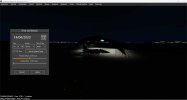
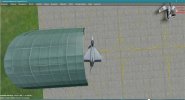
Blender 3.3 will successfully create the LODs. The attached pics shows a hanger close up and at night (the hanger and ground are lit up via use of effects) - both obviously LOD_100 (ie show 100% of the model). In order to show LODs are in effect, I gave LOD_75 a YELLOW texture, LOD_50 a RED texture and LOD_25 a PURPLE texture (you will need to zoom in on the LOD_25 pic to see it is indeed purple).
If you import a model with LODs (or create your own LODs by simply using the appropriate suffix eg. LOD_50 to each model name) keep/add the "random" empty attached to each LOD model. I have not tried removing this empty as it works with it!
If you only have LODs and or animations in your overall model, when you export from Blender, use the .mdl file. THE .X FILE DOES NOT INCLUDE THE LODs NOR ANIMATIONS. If, as in my example, you have LODs AND EFFECTS, when exporting, the .x file HAS the effects but NO LODs NOR ANIMATIONS! You must then use MXC to import the .mdl file and then merge this with the .x file - AND DELETE THE INCORRECT LOD_100 MODEL PART BROUGHT IN BY THE .X FILE. This "anomaly" has been ongoing since Blender 2.8! Let me know if you have any queries.
 

Attachments

  • Hanger-Day-Close.jpg
    Hanger-Day-Close.jpg
    449.6 KB · Views: 195
  • Hanger-Night-Close.jpg
    Hanger-Night-Close.jpg
    176.3 KB · Views: 195
  • Hanger_Above_LOD_100.jpg
    Hanger_Above_LOD_100.jpg
    418.9 KB · Views: 190
  • Hanger_Above_LOD_75.jpg
    Hanger_Above_LOD_75.jpg
    678.9 KB · Views: 199
  • Hanger_Above_LOD_50.jpg
    Hanger_Above_LOD_50.jpg
    867.2 KB · Views: 197
  • Hanger_Above_LOD_25.jpg
    Hanger_Above_LOD_25.jpg
    866.8 KB · Views: 197
Thanks Sengl1er. I've already figured out how to do LOD's successfully, and a great way to see IN SIM the changing effects as you get closer / farther from your model(s).

Unless something has changed, I cannot use anything higher than Blender 3.1.2 due to the exporter not working properly at any higher revisions. (Exporter is Microsoft Flight Simulator glTF extension version 1.1.6).

My example is, I made 3 models, each a successively lower LOD. First set is named "XX_LOD00" (Highest polygons), next "XX_LOD01" next "XX_LOD02" (lowest polygons). The exporter will isolate each out and make separate models. In the exporter you can set the LOD value. This is where it gets good!

(There's a lot more to this, but this is a basic synopsis). Launch MSFS and go into developer mode, load your project airport. (For example). Let's say the model is already placed into the scenery. You can make modifications to the model in Blender, export and it will update in MSFS on the fly! No need to reload scenery or models! You can even manipulate the LOD's, export the model(s), (all LOD"s) and you can zoom in / out of your model in MSFS and see exactly when the LOD changes! This is really handy because I discovered that not all LOD values can be used interchangeably! If your model is BIG, you will have very different LOD values than if the model is really small.

Hope I didn't make it more confusing.

TB2
 
Hi TB2. I thought you were modelling in P3D. I only use P3DV5.3 HF2 with Blender 3.3 and Blender2P3DFSX 0.98.38. As I said, this platform works ok with LODs. .mdl file is used if your model does not contain effects. If it does, the .mdl does not contain ANY effects and has to be merged with the .x file. The .x file lod entries in the material hierarchy must then be deleted, after edit export as .mdl file.
John
 
😂. Now that you mentioned it, I may have started this thread when I was modeling for P3D! 😂. I’ve “evolved” since then.

TB2
 
Back
Top