• Which the release of FS2020 we see an explosition of activity on the forun and of course we are very happy to see this. But having all questions about FS2020 in one forum becomes a bit messy. So therefore we would like to ask you all to use the following guidelines when posting your questions:

    • Tag FS2020 specific questions with the MSFS2020 tag.
    • Questions about making 3D assets can be posted in the 3D asset design forum. Either post them in the subforum of the modelling tool you use or in the general forum if they are general.
    • Questions about aircraft design can be posted in the Aircraft design forum
    • Questions about airport design can be posted in the FS2020 airport design forum. Once airport development tools have been updated for FS2020 you can post tool speciifc questions in the subforums of those tools as well of course.
    • Questions about terrain design can be posted in the FS2020 terrain design forum.
    • Questions about SimConnect can be posted in the SimConnect forum.

    Any other question that is not specific to an aspect of development or tool can be posted in the General chat forum.

    By following these guidelines we make sure that the forums remain easy to read for everybody and also that the right people can find your post to answer it.

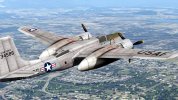
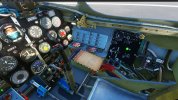
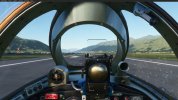
New MiG-15Bis for P3D and MSFS&FSX from BearStudios.

P3D V1.2 files just uploaded to simmarket and just flight, update will be release later on this weekend

Some tips for V1.2
1, Intergated kneeboard:
Hidden when open panel window, just leave the button on right top to press for display pages.
Kneeboard contains GPS map, if it running background before panel open, it may push P3D to CTD when some P3D users have max display settings.

2, Stall and Spin:
Enter Spin:
IAS below 450 Km/h, Engine RPM 7000r, Level Fly Above 6000 meters from ground surface.
Pull stick to max after, Full rudder left or right and maintain, untile aircraft stall and enter spin.

Recovery from spin:
Judge the direction when spinning, then Push stick forward to the white line paint on main panel, reverse full rudder against spin direction and maintain untile sipn stop. It may take some spin rounds before stopping
When spin stopped, Level flight, Push throttle forward to increase IAS exceed 450Km/h.
Below 3000 meters still not recovery from spin, eject from aircraft.

To avoid Stall and Spin, notice IAS and aircraft configution before flight maneuvering.

3. PBR or None PBR
If not use PBR models on P3D, copy and overwrite MDL/testure from FSX version manually to MiG-15 folder in P3D
Notice do not use P3D PBR model on FSX, it will cause model not display

4, Gyro Gunsight
Gyro reticle may have offset after combat maneuvering at high altitude, if pilot counter that, switch off gyro sight to fixed position, then switch up to active gyro again.

Now , full throttle to develope on MSFS version.
 
Last edited:
P3D V1.2 files just uploaded to simmarket and just flight, update will be release later on this weekend

Some tips for V1.2
1, Intergated kneeboard:
Hidden when open panel window, just leave the button on right top to press for display pages.
Kneeboard contains GPS map, if it running background before panel open, it may push P3D to CTD when some P3D users have max display settings.

2, Stall and Spin:
Enter Spin:
IAS below 450 Km/h, Engine RPM 7000r, Level Fly Above 6000 meters from ground surface.
Pull stick to max after, Full rudder left or right and maintain, untile aircraft stall and enter spin.

Recovery from spin:
Judge the direction when spinning, then Push stick forward to the white line paint on main panel, reverse full rudder against spin direction and maintain untile sipn stop. It may take some spin rounds before stopping
When spin stopped, Level flight, Push throttle forward to increase IAS exceed 450Km/h.
Below 3000 meters still not recovery from spin, eject from aircraft.

To avoid Stall and Spin, notice IAS and aircraft configution before flight maneuvering.

3. PBR or None PBR
If not use PBR models on P3D, copy and overwrite MDL/testure from FSX version manually to MiG-15 folder in P3D
Notice do not use P3D PBR model on FSX, it will cause model not display

4, Gyro Gunsight
Gyro reticle may have offset after combat maneuvering at high altitude, if pilot counter that, switch off gyro sight to fixed position, then switch up to active gyro again.

Now , full throttle to develope on MSFS version.
Hello! I bought your nice Mig15 at Justflight when it was in release V1.1 and it was all right. When I installed V1.2, the aircraft doesn't appear , no aircraft at all. My system is : Windows 7 - 64 bit - FSX Gold Edition. I've installed as administrator and
of course uninstalled v1.1 before installing v1.2 chosing FSX (not Steam FSX) during the install process.
 
Hello! I bought your nice Mig15 at Justflight when it was in release V1.1 and it was all right. When I installed V1.2, the aircraft doesn't appear , no aircraft at all. My system is : Windows 7 - 64 bit - FSX Gold Edition. I've installed as administrator and
of course uninstalled v1.1 before installing v1.2 chosing FSX (not Steam FSX) during the install process.
Do you have Prepar3D in default folder (disc C etc.) or you have non default way (custom directory)?
 
Do you have Prepar3D in default folder (disc C etc.) or you have non default way (custom directory)?
I don't have P3D on my PC, I only have the old FSX Gold Edition, up to now this is my only flight simulation platform , bye
Bruno
 
I don't have P3D on my PC, I only have the old FSX Gold Edition, up to now this is my only flight simulation platform , bye
Bruno
This is my fault to put the P3D pbr model to FSX setup folder during building setup, I will get it fixed in this week for a new setup package. when it done, you may need download and install it to overwrite for FSX/FSX SE
I just find this today after your post, very thanks.
 
This is my fault to put the P3D pbr model to FSX setup folder during building setup, I will get it fixed in this week for a new setup package. when it done, you may need download and install it to overwrite for FSX/FSX SE
I just find this today after your post, very thanks.
Thank you wolfgen
 
Korea Air War Simulating
I modify the SOH A-26 and section 8 F-86 for AI traffic in P3D V5, paint A-26 skin as historical pics
 

Attachments

  • 2022-10-4_13-11-59-481.jpg
    2022-10-4_13-11-59-481.jpg
    2.1 MB · Views: 205
  • 2022-10-9_0-1-18-485.jpg
    2022-10-9_0-1-18-485.jpg
    1.4 MB · Views: 214
I have issue on flight model transfer from P3D to MSFS, the aileron and elevator effects to much, reduce flight turnning in flight_model.cfg do not make it simular as P3D
parameter from P3D aircraft`s air and cfg not changed, but act strange in MSFS(when using modern flight model only)
 
Just downloaded and installed V1.2.1 with FSX model, now the problem is solved! Tank you Wolfgen!
I've noticed 2 odd things :
1 : the push-back is not possible using default FSX key combination Ctrl+P, there's a message saying : the push-back is not possible with Mig-15 Bis.
2 : Switching-on the reticule it appears always in the upper left corner of the collimator glass. (Of course I have Tac-pack installed).
 
Just downloaded and installed V1.2.1 with FSX model, now the problem is solved! Tank you Wolfgen!
I've noticed 2 odd things :
1 : the push-back is not possible using default FSX key combination Ctrl+P, there's a message saying : the push-back is not possible with Mig-15 Bis.
2 : Switching-on the reticule it appears always in the upper left corner of the collimator glass. (Of course I have Tac-pack installed).
1, this aircraft has no push-back function, when move aircraft from ramp/ gate, using differencal wheel brake and rudder to handle aircraft steering on low speed not exceed 10 knots.
MiG-15 have no nose steering system, it has poor ground maneuverability than F-86.

2, when gunsight reticule appears, press shift+1 or A to bring gunsight view for aiming.
MiG-15bis gunsight fit at right side as Me-109, not center of cockpit view, it`s left edge almost on aircraft center axis.
Pilot default eyepoint higher than the gunsight reflector glass,
So if still in VC decault view, the reticule display on default eyepoint height and aircraft center axis, just left corner on gunsight reflector glass.
When pilot aiming target, may head down ,nose close to gunsight just point to the brance buffer pad to get eyepoint center to gunsight reflector. I create a camera view for simulate this as gunsight view.
 
1, this aircraft has no push-back function, when move aircraft from ramp/ gate, using differencal wheel brake and rudder to handle aircraft steering on low speed not exceed 10 knots.
MiG-15 have no nose steering system, it has poor ground maneuverability than F-86.

2, when gunsight reticule appears, press shift+1 or A to bring gunsight view for aiming.
MiG-15bis gunsight fit at right side as Me-109, not center of cockpit view, it`s left edge almost on aircraft center axis.
Pilot default eyepoint higher than the gunsight reflector glass,
So if still in VC decault view, the reticule display on default eyepoint height and aircraft center axis, just left corner on gunsight reflector glass.
When pilot aiming target, may head down ,nose close to gunsight just point to the brance buffer pad to get eyepoint center to gunsight reflector. I create a camera view for simulate this as gunsight view.
OK, Thank you for the explanation !
 
1666099186631.png


Change Kneeborad shape to avoid 2d panels display may get lag in MSFS and P3D, for MSFS, create gauge trexture plane and a set of button planes on this shape, for intercative with xml gauge.
Make animation to rise or place by click X button on this shape in VC.
So it make less changes on programming code between 2 simulators. And aviod P3D CTD with 2D complex GPS display totally.
I have no idea to get gunsight in MSFS collimate as P3D/FSX, it seems the material in MSFS have not function on build a tunnel cone to mask the hud/gunsight out of gunsight reflector glass.

this may put in MSFS version aircraft and P3D/FSX version update

MSFS version current complete 3d model, texture and aimation. system simulation on major completed, but flight model and inactive elements still need test and modify.

Is it better to get simulated weapon firing effect in MSFS as FSX with out tacpack, or just remove these effect nodes and elements, change aircraft none armed under EAA rules?

If simulated weapons add to aircraft, I need to get droptanks and bomb shapes as standalone gltf shapes, attach on aircraft with conditional control aimation
 
Know you are hard at work with getting the Mig-15 with MSFS! but out of curiosity have you decided what the next project will be? Mig-15UTI, Mig-17, or something else?
 
Know you are hard at work with getting the Mig-15 with MSFS! but out of curiosity have you decided what the next project will be? Mig-15UTI, Mig-17, or something else?
MiG-17F/FT-5 and UTI, the UTI will be first for build
I am using a new way to build common same part or section for different aircraft models, just as modules section as build ships.
for example, the UTI have same canopy as FT-5, so this section will be build first, and merge to modify MiG-15 base fuselage to a MiG-15 UTI model
then, merge to MiG-17F modified model, change some element shapes (ref from 1970`s chinese FT-5 manual cockpit charts)

MSFS MiG-15bis now on step of add effects and dropable payloads, it advance slowly, but when it complete, other models will follow the same path to build.
 
Yes, perhaps not all things and features are possible in MSFS (yet or as it should be) but Im waiting too! 👍
 
well while MSFS is the the future when it comes to making money, I do hope the UTI and FT-5 get a p3d v4 release! as that is what i use
 
MSFS version Nearly done.
Cockpit with full operational interactive elements, adjustable lights as close as DCS MiG-15Bis
Still need change and complete issues
1, can not create more skins in the main aircraft package folder, the aircraft model just display skins in default texture.base folder, any of skins contains in texture.xx can not display. I check and rebuild aircraft.cfg, model.cfg and layout.json, but no effect.
same skin dds and related json file copy into texture.base folder can display.
2, cursor and range zoom buttons follow the same node name,animatiom and define after default extra 330 aircraft can not working, but other hard and soft key , include ent/clr/menu/direct-to and nearest pages button, can work, so the gps chart in kneeboard can not set direct to flight plan now( no cursor operate for selection or input icao code on direct-to and nearest pages). it is another strange issues. I working on it for 2 weeks, but no sucess.
3, Can not access wwise site and obtian the wwise sound tool, so aircraft just refer sound from default CJ-4 jet soundpack.
Any advisor or help for fix issues above? Thanks for all of posts!
 

Attachments

  • MSFS_2022-12-17-210520_no-geocode-found.jpg
    MSFS_2022-12-17-210520_no-geocode-found.jpg
    2.4 MB · Views: 237
  • MSFS_2022-12-17-210508_no-geocode-found.jpg
    MSFS_2022-12-17-210508_no-geocode-found.jpg
    2.3 MB · Views: 185
  • MSFS_2022-12-17-210427_no-geocode-found.jpg
    MSFS_2022-12-17-210427_no-geocode-found.jpg
    2.3 MB · Views: 226
  • MSFS_2022-12-17-210355_no-geocode-found.jpg
    MSFS_2022-12-17-210355_no-geocode-found.jpg
    2.2 MB · Views: 198
  • MSFS_2022-12-17-210320_no-geocode-found.jpg
    MSFS_2022-12-17-210320_no-geocode-found.jpg
    2.3 MB · Views: 209
  • MSFS_2022-12-17-210312_no-geocode-found.jpg
    MSFS_2022-12-17-210312_no-geocode-found.jpg
    2 MB · Views: 204
  • MSFS_2022-12-17-210304_no-geocode-found.jpg
    MSFS_2022-12-17-210304_no-geocode-found.jpg
    2.1 MB · Views: 223
  • MSFS_2022-12-17-210255_no-geocode-found.jpg
    MSFS_2022-12-17-210255_no-geocode-found.jpg
    2.2 MB · Views: 202
  • MSFS_2022-12-17-210246_no-geocode-found.jpg
    MSFS_2022-12-17-210246_no-geocode-found.jpg
    2.3 MB · Views: 218
  • MSFS_2022-12-17-210207_no-geocode-found.jpg
    MSFS_2022-12-17-210207_no-geocode-found.jpg
    2 MB · Views: 219
Ad1. Did you created layout file for each skin? It should look like this, I added MSFS layout generator, file which I use it: https://www.sendspace.com/file/fq4ut1 just take layout.json file and drop over generator file (to update it, you have to do for each skin).
 

Attachments

  • Nowy-1.jpg
    Nowy-1.jpg
    27 KB · Views: 160
Back
Top