
-
Which the release of FS2020 we see an explosition of activity on the forun and of course we are very happy to see this. But having all questions about FS2020 in one forum becomes a bit messy. So therefore we would like to ask you all to use the following guidelines when posting your questions:
- Tag FS2020 specific questions with the MSFS2020 tag.
- Questions about making 3D assets can be posted in the 3D asset design forum. Either post them in the subforum of the modelling tool you use or in the general forum if they are general.
- Questions about aircraft design can be posted in the Aircraft design forum
- Questions about airport design can be posted in the FS2020 airport design forum. Once airport development tools have been updated for FS2020 you can post tool speciifc questions in the subforums of those tools as well of course.
- Questions about terrain design can be posted in the FS2020 terrain design forum.
- Questions about SimConnect can be posted in the SimConnect forum.
Any other question that is not specific to an aspect of development or tool can be posted in the General chat forum.
By following these guidelines we make sure that the forums remain easy to read for everybody and also that the right people can find your post to answer it.
You are using an out of date browser. It may not display this or other websites correctly.
You should upgrade or use an alternative browser.
You should upgrade or use an alternative browser.
Root element is not a JSON object
- Thread starter NotBasti
- Start date
-
- Tags
- blender blender2msfs msfs



These are just suggestions, I can't guarantee they work.
xml has no space, gltf and bin have a space in their filenames. I'd try to avoid having spaces in my file names but that's just me. I'd also avoid having them as different names (which the extra space does). You can open the gltf in a text editor and check that "export_xml_file" correctly addresses the xml file and at the bottom of the file the "uri" correctly calls the .bin file. Having said that I'd re-export the model making sure the xml and bin and gltf files all have the same file names rather than try to edit the files directly. Unless you really know what you are doing you can just end up making things worse when it's just easier to export the files again.
xml has no space, gltf and bin have a space in their filenames. I'd try to avoid having spaces in my file names but that's just me. I'd also avoid having them as different names (which the extra space does). You can open the gltf in a text editor and check that "export_xml_file" correctly addresses the xml file and at the bottom of the file the "uri" correctly calls the .bin file. Having said that I'd re-export the model making sure the xml and bin and gltf files all have the same file names rather than try to edit the files directly. Unless you really know what you are doing you can just end up making things worse when it's just easier to export the files again.

- Messages
- 19
- Country


- Messages
- 210
- Country
Follow this short video:
This works fine. Batch Export will not work so far. If you make a model in Blender, you could make 3 models, one full detailed and 2 others as lower LOD models.
For example mymodel, mymodel-LOD01, mymodell-LOD02.
Only select one of the models and export it to the folder mymodel in modelLib. Do this with all of your 3 models.
Next open the xml file and change it to something like this:
<?xml version="1.0" ?>
<ModelInfo guid="{fee6bacb-5bcc-474d-g6a3-b73282d1081}" version="1.1">
<LODS>
<LOD ModelFile="mymodel.gltf" minSize="8"/>
<LOD ModelFile="mymodel-LOD01.gltf" minSize="4"/>
<LOD ModelFile="mymodel-LOD02.gltf"/>
</LODS>
</ModelInfo>
The gltf model could not be opened with the 3d viewer. If you can see your model in the 3dviewer of windows, it has the wrong format.
This works fine. Batch Export will not work so far. If you make a model in Blender, you could make 3 models, one full detailed and 2 others as lower LOD models.
For example mymodel, mymodel-LOD01, mymodell-LOD02.
Only select one of the models and export it to the folder mymodel in modelLib. Do this with all of your 3 models.
Next open the xml file and change it to something like this:
<?xml version="1.0" ?>
<ModelInfo guid="{fee6bacb-5bcc-474d-g6a3-b73282d1081}" version="1.1">
<LODS>
<LOD ModelFile="mymodel.gltf" minSize="8"/>
<LOD ModelFile="mymodel-LOD01.gltf" minSize="4"/>
<LOD ModelFile="mymodel-LOD02.gltf"/>
</LODS>
</ModelInfo>
The gltf model could not be opened with the 3d viewer. If you can see your model in the 3dviewer of windows, it has the wrong format.
- Messages
- 210
- Country
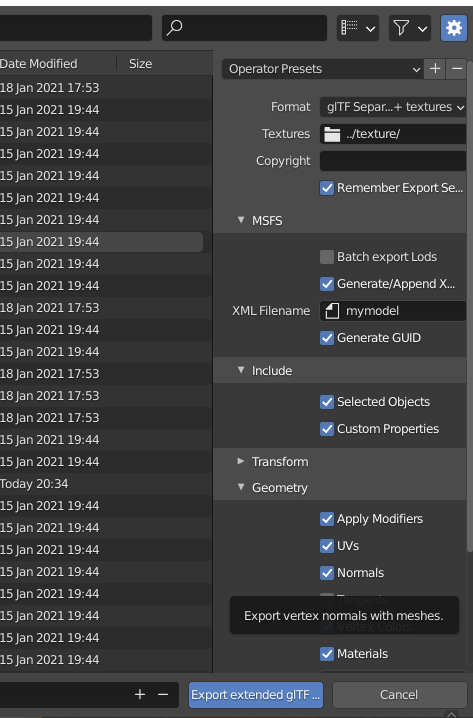
You must set create GUID in the exporter window. You can find this in MSFS
- Messages
- 210
- Country
Then it should look like this
<?xml version="1.0"?>
<ModelInfo version="1.1" guid="{9e7af85b-0fd9-4640-2c6c-ab2850e206b2}"/>
<?xml version="1.0"?>
<ModelInfo version="1.1" guid="{9e7af85b-0fd9-4640-2c6c-ab2850e206b2}"/>
OK, I loaded your original blender model and exported it.
In the export settings I turned Geometry - Tangents OFF (there is an error with it on as MSFS does not support tangents)
Man, you need to clean this model up. You don't need polygons on the undersides of buildings. That's just wasted frames. And reset the scaling on your parts. Cube.001 has negative scaling which is not good.
Here are the exported files. They compile into a library although I don't know what they look like in sim.
In the export settings I turned Geometry - Tangents OFF (there is an error with it on as MSFS does not support tangents)
Man, you need to clean this model up. You don't need polygons on the undersides of buildings. That's just wasted frames. And reset the scaling on your parts. Cube.001 has negative scaling which is not good.
Here are the exported files. They compile into a library although I don't know what they look like in sim.
Attachments
- Messages
- 210
- Country
The error you get above will be from a wrong path. You must compare the path and name of the model which is shown in the message with the real name of model and path in your explorer.
I had some errors when I use _ character. Not sure, but maybe it is also case sensitive, not sure about that. You are German, right? I also from Germany and use only windows with language setting to English. Because some tools and exporters have problems with , or . as decimal in sizes. And sometimes models can crash simulators if you use ä or ü or something like that. I had this problem when someone used my model on a japanese windows.
Before you export models from Blender, right click and apply rotation and scale. And clean your models, for example merge vertices by distance.
I had some errors when I use _ character. Not sure, but maybe it is also case sensitive, not sure about that. You are German, right? I also from Germany and use only windows with language setting to English. Because some tools and exporters have problems with , or . as decimal in sizes. And sometimes models can crash simulators if you use ä or ü or something like that. I had this problem when someone used my model on a japanese windows.
Before you export models from Blender, right click and apply rotation and scale. And clean your models, for example merge vertices by distance.
- Messages
- 19
- Country
First of all, thank you!OK, I loaded your original blender model and exported it.
In the export settings I turned Geometry - Tangents OFF (there is an error with it on as MSFS does not support tangents)
Man, you need to clean this model up. You don't need polygons on the undersides of buildings. That's just wasted frames. And reset the scaling on your parts. Cube.001 has negative scaling which is not good.
Here are the exported files. They compile into a library although I don't know what they look like in sim.
Yes, indeed. There is still lots of work to do and i'm still quite a beginner. I will test the files out later
- Messages
- 19
- Country
Ok, thank you for all this advice! You two really helped me out!The error you get above will be from a wrong path. You must compare the path and name of the model which is shown in the message with the real name of model and path in your explorer.
I had some errors when I use _ character. Not sure, but maybe it is also case sensitive, not sure about that. You are German, right? I also from Germany and use only windows with language setting to English. Because some tools and exporters have problems with , or . as decimal in sizes. And sometimes models can crash simulators if you use ä or ü or something like that. I had this problem when someone used my model on a japanese windows.
Before you export models from Blender, right click and apply rotation and scale. And clean your models, for example merge vertices by distance.