

Okay, I referred to the manual (Surprise) and noted
ADE_GP employs two working texture folders
Textures_Dpy contains a 24-bit version of each texture in the folder
Textures.
Place a copy of the DXT or 32-bit version of the texture in the Textures
folder and a 24-bit texture showing whatever you want to see in the editor in the Textures_Dpy
folder. (See the two versions of gp_PatternedLines or gp_Patterns for examples.) If your texture
As noted below:
I placed the stock dds texture from the scenery/texture folder as is in the C:\MSFS\FS Design Tools\Airport Design Editor 179 Test\Textures folder.
If you wish to use .dds textures with FSX or P3D, you may do so by making .dds versions of the
textures in the Textures folder (where required) and saving them there in addition to, or in place
of, the .bmp textures. To propagate the .dds textures to any existing airport using .bmp textures,
simply recompile the airport(s). However, you'll have to delete the previously-existing .bmp
textures from the airport's \textures subfolder by hand.
I also noted this statement
If you place a ground poly at a location that has not been flattened or that
has been flattened to other than the reference point elevation, the poly will not be
visible if/where the elevation of the ground is higher than the reference point, or it
will be "floating" if ground is lower.
Now I manged to get a flickering 22 the in my first attempt. I feel that there is one small item that is not quite right and preventing visible numbers/
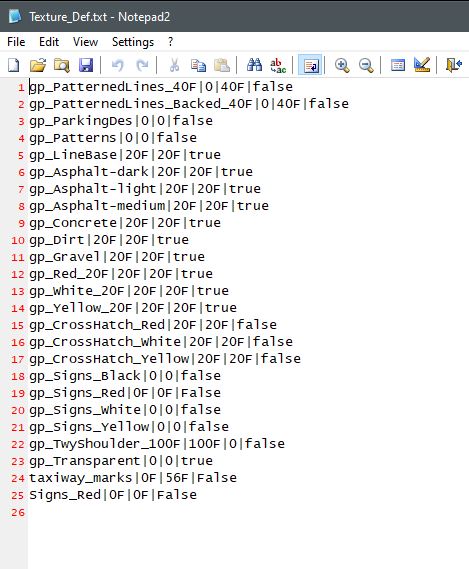
Line #19 and #25 refer to a red sign. Is that maybe the issue here?
ADE_GP employs two working texture folders
Textures_Dpy contains a 24-bit version of each texture in the folder
Textures.
Place a copy of the DXT or 32-bit version of the texture in the Textures
folder and a 24-bit texture showing whatever you want to see in the editor in the Textures_Dpy
folder. (See the two versions of gp_PatternedLines or gp_Patterns for examples.) If your texture
As noted below:
I placed the stock dds texture from the scenery/texture folder as is in the C:\MSFS\FS Design Tools\Airport Design Editor 179 Test\Textures folder.
If you wish to use .dds textures with FSX or P3D, you may do so by making .dds versions of the
textures in the Textures folder (where required) and saving them there in addition to, or in place
of, the .bmp textures. To propagate the .dds textures to any existing airport using .bmp textures,
simply recompile the airport(s). However, you'll have to delete the previously-existing .bmp
textures from the airport's \textures subfolder by hand.
I also noted this statement
If you place a ground poly at a location that has not been flattened or that
has been flattened to other than the reference point elevation, the poly will not be
visible if/where the elevation of the ground is higher than the reference point, or it
will be "floating" if ground is lower.
Now I manged to get a flickering 22 the in my first attempt. I feel that there is one small item that is not quite right and preventing visible numbers/
Line #19 and #25 refer to a red sign. Is that maybe the issue here?
Last edited:


