• Which the release of FS2020 we see an explosition of activity on the forun and of course we are very happy to see this. But having all questions about FS2020 in one forum becomes a bit messy. So therefore we would like to ask you all to use the following guidelines when posting your questions:

    • Tag FS2020 specific questions with the MSFS2020 tag.
    • Questions about making 3D assets can be posted in the 3D asset design forum. Either post them in the subforum of the modelling tool you use or in the general forum if they are general.
    • Questions about aircraft design can be posted in the Aircraft design forum
    • Questions about airport design can be posted in the FS2020 airport design forum. Once airport development tools have been updated for FS2020 you can post tool speciifc questions in the subforums of those tools as well of course.
    • Questions about terrain design can be posted in the FS2020 terrain design forum.
    • Questions about SimConnect can be posted in the SimConnect forum.

    Any other question that is not specific to an aspect of development or tool can be posted in the General chat forum.

    By following these guidelines we make sure that the forums remain easy to read for everybody and also that the right people can find your post to answer it.

MSFS20 What is the best method to add lighting effects to a building

Status
Not open for further replies.
Messages
1,819
Country
australia
MSFS2020

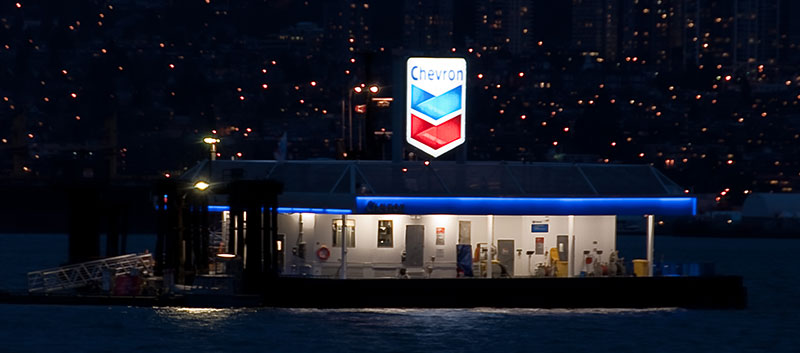
I have created a scenery object of a fuel barge and want to add overhead lighting which only lights up the wall and floor beneath it and the actual light/lamp is unseen as in this actual photo of the fuel barge.

Firstly is it best to use SDK lighting eg light warm medium or add lighting in Blender? I don't necessarily want to the lights/lamps/globes to be seen.

Secondly to the best method to make the (Chevron) sign light up during the night? Add the image/material as MSFS emissive (MSFS Standard)?
Thanks

night.jpg
 
Hi John:

Not wishing to make you work too hard in seeking 'quick' answers, here are some pertinent threads, some (most) of which you instigated: ;)

https://www.fsdeveloper.com/forum/t...t-which-displays-as-an-emissive-light.455166/

https://www.fsdeveloper.com/forum/threads/how-to-get-night-lightning-in-a-nice-way.458800/

https://www.fsdeveloper.com/forum/threads/airport-name-signage-with-lights.458162/

https://www.fsdeveloper.com/forum/t...-sign-glow-in-daylight-msfs2020.460632/page-2


Dick's valuable collection of posts on FS lights deserve a listing all their own: :wizard:

https://www.google.com/search?q=asite:+www.fsdeveloper.com+rhumbaflappy+MSFS+punctal+light&client=firefox-b-1-d&hs=lsM&sca_esv=089c91361eed6c29&biw=1200&bih=586&ei=awfdac65JLCYptQPpv6YgAo&ved=0ahUKEwiOm-aTjuuTAxUwjIkEHSY_BqA4ChDh1QMIEQ&uact=5&oq=asite:+www.fsdeveloper.com+rhumbaflappy+MSFS+punctal+light&gs_lp=Egxnd3Mtd2l6LXNlcnAiOmFzaXRlOiB3d3cuZnNkZXZlbG9wZXIuY29tIHJodW1iYWZsYXBweSBNU0ZTIHB1bmN0YWwgbGlnaHQyBRAAGO8FMgUQABjvBTIFEAAY7wUyBRAAGO8FMggQABiiBBiJBUjna1CBDFiNYXABeACQAQGYAbcBoAGTGaoBBTIyLjEyuAEDyAEA-AEB-AECmAIGoALVBMICCBAAGIAEGKIEwgIIECEYoAEYwwSYAwCIBgGSBwMyLjSgB_dJsgcDMi40uAfVBMIHAzAuNsgHCYAIAA&sclient=gws-wiz-serp


Most of the above threads deal with directional "light" emitted in 'visible' patterns (beams, cones, etc.) from illuminated objects.


IIUC, your OP above seeks a way to create a:

* _LM suffix, "LightMap" (FS2Kx)

...or:

* _emis suffix, "Emissive" (MSFS) texture Material using the MSFS SDK Day / Night switch.


In that scenario we do not even need to see any light beams, cones, etc., as surfaces on 3D objects of interest are just 'illuminated' at night.


AFAIK, this would involve a simple "Emissive Map as the Emissive texture" via Material attributes: :teacher:

https://docs.flightsimulator.com/ht...rframe/Texturing/Lights.htm?rhhlterm=Emissive


An additional consideration is use of Emissive Elements with Emissive Textures for decals.

https://docs.flightsimulator.com/ht...ling/Cockpit/Texturing/Emissive_Materials.htm

"This means that you will need to have an emissive texture as part of the decal texture."

"NOTE: The emissive map is a separate texture that should have the same name as the albedo texture,
...except it should be suffixed with '_emis' instead of '_albd'.


Bearing in mind that Decals may be regarded as "Translucent Elements":

https://docs.flightsimulator.com/ht...ng/Cockpit/Texturing/Translucent_Elements.htm

"TRANSLUCENT ELEMENTS

Within the cockpit and cabin you will have various elements that require translucent materials (glass or plastic coverings, sun visors, etc...). This page outlines recommendations for creating these elements.

Some general notes on these elements:

  • In some case it may be better to have translucent objects as separate objects to avoid flickering when they overlap each other on the screen.
  • Object rendering is sorted from back to front using the mesh center. As such, it's more convenient to have each transparent part as a separate object for the sort to work correctly. Note that by mesh center we mean the actual mesh bounding box center, not the pivot position (pivot position does not affect the draw order sort algorithm).

The Glass Material​


The material used for translucent/transparent elements is the Glass material preset. Do not use the Windshield preset for anything other than the windshield itself (explained here), as then you'll get rain/ice effects on your transparent surfaces!

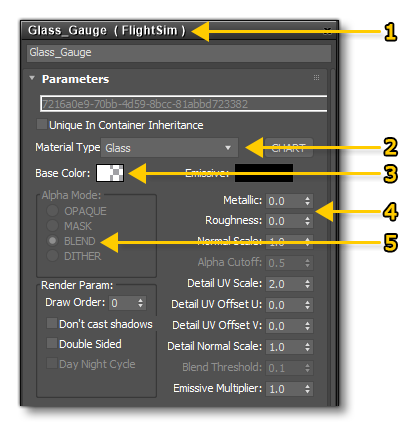
To set up the glass material you need to do the following:


Glass Material Setup

  1. Create a new FlightSim material
  2. Call it "GLASS" - or some other appropriate name - and set the Material Type to Glass as well
  3. Set the alpha of the Base Colour to 0.01
  4. Set the Roughness to 0.0 and the Metalness to 0.0
  5. Set the Alpha Mode to BLEND


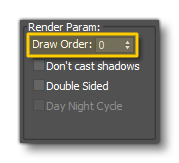
It should be noted that both Glass and Windshield materials are rendered in the same layer by the engine, and you can have any number of glass materials overlapping on screen without them masking each other. However, you may experience flickering when multiple transparent (and decal) material types are layered on top of each other in the rendered output. In these cases you can change the Draw Order value:


The Glass Material Draw Order


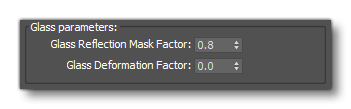
Finally you can use the following two values to modify the way that the glass looks in the simulation:


glass_3_params.png

  • You can change the cubemap reflection by changing the value for the Reflection Mask Factor
  • You can add imperfections in the glass quality by using the Glass Deformation Factor (good for gauge covers, for example)"


=rk= submitted this example for a Decal:

https://www.fsdeveloper.com/forum/threads/airport-name-signage-with-lights.458162/post-922049


However, Dick offers this practical clarification to a workflow for a simple 'Standard Emissive' object not rendered as an aircraft gauge / Decal:

https://www.fsdeveloper.com/forum/threads/airport-name-signage-with-lights.458162/post-922065

Not sure why you are using Decal. Standard gives you control of the Day-Night cycle, which you might want. You can use an emissive color or a PBR Emissive texture. You might also want to make the colored text faces assigned as a separate mesh. Then controlling the color and emission is a bit easier.

GaryGB
 
Last edited:
Gary

What can I say? Thanks just doesn't seem to be enough for all the info that you have given.

I will investigate the links etc later today after I return home from shopping.

I am just completing a scenery object of the fuel barge which I started off as being low poly and low detail (eg square handrails instead of round etc etc) as anyone using my Vancouver Water airport and indeed real pilots in the area would never go near enough to see but now containing a lot more detail including some inside the building! The real barge has a lot more 'stuff lying around' which I won't model. IT has been very challenging locating images of the real barge and using Google Earth trying to work out sizes, angles (the two building are almost octagonal in shape) and layout. I just love using Blender and continually learning. I need to hone my skills with materials though for more realism. And I will look for tutorials on that.

Woo Hoo!

chevron.jpg
 
You are well prepared to make a scenery such as this considering all the fine work you did previously on CAX3 Sechelt; thanks for fixing up this part of the MSFS PNW so well. :)

Hah... a first screenie taken in a working Windows 11 Pro install (safely contained in a "cage" on a fast 400 mbps USB drive via RUFUS and a directly downloaded MS Win 11 ISO). :p

If I don't get some sleep soon, I may say on my next trip to StarBucks: "I'll have a Venti non-fat Latte at 140, and 'Windows To Go' on a warm USB drive, please". :rotfl:

GaryGB

vancouver-international-water-airport_gmaps_gesv-1-jpg.99597
 

Attachments

  • Vancouver International Water Airport_GMAPS_GESV-1.jpg
    Vancouver International Water Airport_GMAPS_GESV-1.jpg
    104.6 KB · Views: 116
Last edited:
1776202649601.png


Aha, the seaplane base (containing the Flying Beaver Bar) south of Vancouver International. Are you asking for it to be modelled? I guess I could start with just the docks (I need to get on with garden and house maintenance).
You are naughty. I have already got interested in modelling it and have captured 30 images from Google Earth and FB etc etc. Just in case (I decide to do it) of course. Actually there are two seaplane 'bases'/buildings, Harbour Air (as you see in the satellite view) AND SeaAir seaplanes. Two buildings to model. :eek:
I think I saw this water 'airport' some time ago and then (maybe deliberately) forgot about it.

ANYWAY I am off topic!
 
Last edited:
By all means, take your time.

But I shall look forward to another place I can fly into with Lagaffe's excellent PBY.

Hmmm... 'Flying Beaver Bar'.

Looks like I'd need to sleep in the cargo bay of the PBY after my visit ("8 hours from bottle to throttle"). 😎

GaryGB
 
Last edited:
BTW if you have 2024 there is a very simple airport adjacent to Vancouver International and it's ICAO is CAM9 which is a TC LID whatever they are but not ICAO. Downloadable at flightsim.to
 
It works in 2020 or should I say it doesn't crash. I only see some very low poly floating docks.

Sorry I just had another look and see it IS for 2020 not 2024. Sorry
 
Last edited:
I have not yet looked at what the developer actually provided in a MSFS 2020 flight, but his description reads:

"CAM9 - Vancouver International Seaplane Base
Situated beside Vancouver International Airport, this seaport serves many local communities within British Columbia. This airport is not handcrafted, it simply provides spawnpoints for aircraft, as it is not included in the base version of MSFS. However, I do have handcrafted models I was working on for this airport back in July, which I may continue to work on for a future release."

IIUC, the developer only provides "Airport" XML element source code for FS AFD-type "Start Locations" ...in the water airport area ?

I doubt that these very basic object types will crash either MSFS version if they are created from inside proper "Airport" XML element source code.


UPDATE:

I just loaded up a flight at CAM9 in MSFS 2024, and no problems seen; there are some docks and a Helipad there.


Yikes... that area surely needs some of your TLC; I'm surprised at how under-developed this airport complex is in MSFS. :yikes:

Asobo does have a big world to model; but this was an area already extensively developed in FS9 / FSX / P3D 9by 3rd parties).

Does that mean Asobo's "telemetry" shows less recent flying of that area ?

Maybe the FS old-timers are 'all flown out' in that area from past years FS2Kx. :cool:

GaryGB
 
Last edited:
I think that perhaps most people apart from those living in the area would even know about this 'airport' exists.

I have downloaded a lot of images of the 2 'airport' buildings and took 'measurements' of docks and buildings from Google Earth and will start to model them in the near future. Should be fun, and challenging.
Is the CAM9 'airport' for FSX still available?
Image21.jpg


Image25.jpg

Image12.jpg


etc
 
I got the one from Flyaway.
Does ModelConverterX still work for you? It won't run on W10 anymore. TRied a few diffeernt version.
 
All versions of MCX work for me on Windows 10 if I have certain prerequisite RunTimes installed,

I'll try to find the recent thread, where Arno explains what to install, as others have had that issue in Windows 10 as well. :coffee:

UPDATE:

https://www.fsdeveloper.com/forum/threads/latest-mcx-version.460327/


Would you like me to look at anything in MCX from the above cited "FSX British Columbia Float Bases Scenery" after installed ?


FYI: It is also possible to easily load (most) FSX scenery into MSFS 2020 so it displays using MSFS SDK Scenery Editor etc. ;)

NOTE: This does not require de-compiling / re-compiling FSX scenery packages; just a few steps making files / sub-folders.

https://www.fsdeveloper.com/forum/threads/draw-order-of-gps.460365/post-936480

https://www.fsdeveloper.com/forum/threads/using-fsx-object-libraries-in-msfs.455643/post-934338

GaryGB
 
Last edited:
Thanks,

I thought that it was a recent W10 update causing it as it started up and ran a few months ago and now won't. Even tried downloading again without success.

Hey the penny just dropped.

I worked out that I mustn't have .net installed as 3 months ago in an attempt to fix an ongoing problem where my PC thought I was not connected to the internet when attempting to run MSFS I did a Windows Reset not thinking that it basically reinstalls Windows but keeps all your files. That must have removed .net as I just reinstalled it and MCX now runs.

BTW I uploaded my latest version of my Vancouver Water Airport which includes the fuel barge to flightsim.to
Do you want off dock parking for the PBY?

Thanks
 
Last edited:
Looks great, John. :)


Off dock parking for the PBY suits me fine, as I can probably get a small water taxi to shore, rather than squeeze into the dock area.

Still getting oriented after having been away from Vancouver for 20 years.


I am also trying to figure out the location of a "sales area" window to look into. :scratchch


Which 'watering hole' is closest to the fuel barge ? ;)

I'll need to 'wet my whistle' after flying up North from the US PNW Olympic Peninsula.

GaryGB
 
I will add off dock parking and upload it.

Have a look at the image of the fuel barge at night and you will see a small 'light' in a window. That is the sales area.

Not sure what you mean by 'watering hole'. If you mean hotel/bar maybe Cardero's Restaurant at 1583 Coal Harbour Quay.
Is that too far to walk?

1776754058745.png

 
Well, walking on water has been 'out of style' for the last 2,000 years or so; but, sure, that location looks good to park a PBY. :)

I don't think I'll attempt swimming the current of the Frasier River, though; a water taxi is more of a 'successful' option. :cool:


Now I'm off to see if I can find an old copy of Fisherman Dave's 3D People, which seems to have been removed from flightsim.to.

GaryGB
 
If you mean Dave's 3D people. I have a copy.
BTW CAM9 is on it's way
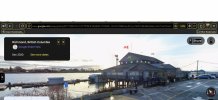
Part of the Seair Seaplanes terminal building (CAM9) started last night -
1776841260697.png

1776841327363.png


I just purchased a new laptop so need to spend time setting that up and installing software.
 
Last edited:
I'll close this.. getting off topic. Start a new thread if you like.
 
Status
Not open for further replies.
Back
Top