• Which the release of FS2020 we see an explosition of activity on the forun and of course we are very happy to see this. But having all questions about FS2020 in one forum becomes a bit messy. So therefore we would like to ask you all to use the following guidelines when posting your questions:

    • Tag FS2020 specific questions with the MSFS2020 tag.
    • Questions about making 3D assets can be posted in the 3D asset design forum. Either post them in the subforum of the modelling tool you use or in the general forum if they are general.
    • Questions about aircraft design can be posted in the Aircraft design forum
    • Questions about airport design can be posted in the FS2020 airport design forum. Once airport development tools have been updated for FS2020 you can post tool speciifc questions in the subforums of those tools as well of course.
    • Questions about terrain design can be posted in the FS2020 terrain design forum.
    • Questions about SimConnect can be posted in the SimConnect forum.

    Any other question that is not specific to an aspect of development or tool can be posted in the General chat forum.

    By following these guidelines we make sure that the forums remain easy to read for everybody and also that the right people can find your post to answer it.

Suggestions for Future Version 2012

Status
Not open for further replies.
2) Create area templates with the option to select reference point and rotate the template. And saving the template data with the object group created with the template to allow the entire group to be tweaked all at once.

Do you mean a group of objects?
 
Suggestion:
When I want to make a single, full length runway link, or move any object, for some reason I want to say ADE did this before, but I may be wrong, so in that instance, I have this to suggest.
I want to move an object or link to a location outside of my current view. I can do this multiple ways: lat/long placement is one, drag and drop incrementally until where I want it is another, I can click the item and zoom out with the mousewheel and drag and drop.
The way I would prefer to do this, and I do not know how many would like this, is I zoom in, I click-hold the item, zoom in/out and be able to drag the item to its new location without it releasing the item from the click-hold.
At the same time, I want to zoom into a spot, click-hold the item and move the item to a distance just outside of the current viewport, so I just click the mousewheel and drag the screen to where I want. But once the mousewheel is clicked, while a click-hold on an item is in play, it will not 'pan' the screen. and you can not 'pick up' an item if you want to pan the screen to place the item.
I have no idea how to explain this, but i see it clear as day in my mind.
So I will do this as well:
Left mouse button is the action button. Click to open, create, move, and select. Holding the click on an item will pick it up. Moving the mouse will move the item as long as the button is held.
Center mouse wheel will zoom in and out, and when clicked down, will pan the screen, but not when using the left mouse button at the same time. I want to use both at the same time.
Also when you leftclick-hold an item and move it to the edge of the viewport say to the far left of the screen, the window will slow-pan in that direction. Im a little impatient :) using the mousewheel click will move in that direction a heckova lot faster.
 
And the ability to use a selection rectangle to select multiple items on top of an image when the image is locked.
 
Suggestion:
When I want to make a single, full length runway link, or move any object, for some reason I want to say ADE did this before, but I may be wrong, so in that instance, I have this to suggest.
I want to move an object or link to a location outside of my current view. I can do this multiple ways: lat/long placement is one, drag and drop incrementally until where I want it is another, I can click the item and zoom out with the mousewheel and drag and drop.
The way I would prefer to do this, and I do not know how many would like this, is I zoom in, I click-hold the item, zoom in/out and be able to drag the item to its new location without it releasing the item from the click-hold.
At the same time, I want to zoom into a spot, click-hold the item and move the item to a distance just outside of the current viewport, so I just click the mousewheel and drag the screen to where I want. But once the mousewheel is clicked, while a click-hold on an item is in play, it will not 'pan' the screen. and you can not 'pick up' an item if you want to pan the screen to place the item.
I have no idea how to explain this, but i see it clear as day in my mind.
So I will do this as well:
Left mouse button is the action button. Click to open, create, move, and select. Holding the click on an item will pick it up. Moving the mouse will move the item as long as the button is held.
Center mouse wheel will zoom in and out, and when clicked down, will pan the screen, but not when using the left mouse button at the same time. I want to use both at the same time.
Also when you leftclick-hold an item and move it to the edge of the viewport say to the far left of the screen, the window will slow-pan in that direction. Im a little impatient :) using the mousewheel click will move in that direction a heckova lot faster.

I will certainly look at this....
 
Did you ever consider adding a provision to export layot in groundpoly breakdown regarding runways and approach lights?

I suppose this could work somewhere in area of - if exporting to scasm, rid the xml runways of all lightning and marking properties, and create scasm with equivalent properties. But I dont know how hard would it be to implement.
 
Did you ever consider adding a provision to export layot in groundpoly breakdown regarding runways and approach lights?

I suppose this could work somewhere in area of - if exporting to scasm, rid the xml runways of all lightning and marking properties, and create scasm with equivalent properties. But I dont know how hard would it be to implement.

I am not sure what that means :o
 
Yeah, consequences of posting at four in the morning.

I was asking if you ever considered to make a function to make a combination SCASM/AF export, as you would need if you use ground polygons.

Meaning that all the non-runway stuff will be exported via xml, as normally, and runway will be "broken down" - some elements, such as size, paths would be included in the xml, and ADE would automatically export a SCASM runway with the same properties that ADE runway has.

As this would eliminate the need to make the SCASM runway from scratch, and lessen risk of errors when doing that.
 
I guess this is my ignorance but why would we generate SCASM runways if we are generating them in accordance with the FS9 etc SDKs?
 
A fair point. But I think groundpoly method is still very popular these days.

But it is your program and your decisions, if the policy is to be 9/x SDK adhering, it is a fair decision.
 
A fair point. But I think groundpoly method is still very popular these days.

But it is your program and your decisions, if the policy is to be 9/x SDK adhering, it is a fair decision.

Generally that is the case. There is still a lot on he development list for work based on the SDKs so I do not rule it out but it would be some way off :)
 
Vertex snap for building terrain/apron polygons that are adjacent to each other.
[EDIT]
Chamfer/smooth option for terrain/apron polygons.
Ghost polygon line going from last vertex created to mouse cursor.
Allow input coordinates to set position up but not over N/S 90 and E/W 180.
[/EDIT]
 
Last edited:
I need a polygon to use as an outline when I am doing something like my aircraft carriers.

When I place the static object shell (the hull) all I get is a rectangle. I need something I can use to make an outline of the deck so i can see the areas i can place static objects (airplanes, etc).

Are any of the existing polygons useable for this?

It's a tedious process to find the edges of the flight deck.

Bob Macklin
Seattle, Wa
 
I need a polygon to use as an outline when I am doing something like my aircraft carriers.

When I place the static object shell (the hull) all I get is a rectangle. I need something I can use to make an outline of the deck so i can see the areas i can place static objects (airplanes, etc).

Are any of the existing polygons useable for this?

It's a tedious process to find the edges of the flight deck.

Bob Macklin
Seattle, Wa

Not really - there are helper shapes but you can't freedraw them. That sounds like a useful addition and I will add it to the development list. I guess the other alternative would be to use an apron as a temporary measure or even a set of apronf edge lights.
 
Thanks Jon,

I have been using a fence during development then removing it when the project is complete.

I would be nice to have something that did not have to be removed so it would be available for future modifications.

Bob Macklin
Seattle, Wa
 
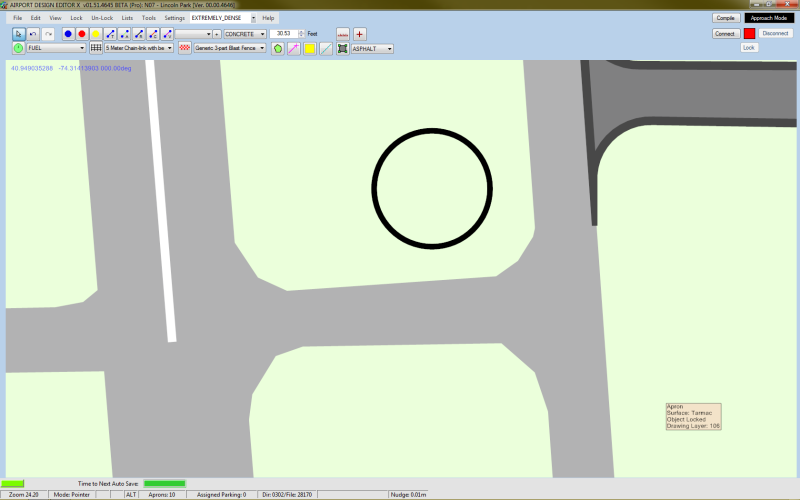
I might have suggested this before but - can we have edge-select aprons as an option? I'm really getting tired of accidentally selecting aprons I don't want to - it's kind of ridiculous how far away you can select an apron:

edgeselect.png


The tooltip is where the mouse cursor is when I left-clicked and selected the apron at the top of the screen. I've managed to select that apron while the mouse cursor was over the taxiway to the left, even

Ctrl+A over the apron is much more preferable (and accurate) - to me at least, which is why I say make the edge select an option rather than remove it entirely
 
Status
Not open for further replies.
Back
Top